There is an influx of traffic. Good numbers. honorable rankings. But sales aren’t happening. The leads are no longer present. You don’t know why. This is the actual situation. Traffic is only noise if there are no conversions.
A Google ranking is not enough in 2026. You must understand why guests depart without taking any action. A comprehensive SEO assessment includes more than just rankings. It pinpoints the exact reasons behind the revenue leak on your website.
There are solutions for every issue, including slow page loading, poor call-to-action (CTA) optimization, misaligned search intent, and broken trust signals. This article describes how to identify conversion killers through an SEO audit in 2026, providing a step-by-step roadmap to turn your existing visitors into measurable results.
A comprehensive assessment starts with understanding the difference between SEO analysis and an SEO audit, as each serves a unique purpose in identifying site weaknesses
Why SEO Without a Conversion Strategy Fails
Most people consider SEO and conversion rate optimization (CRO) to be two different activities. One team is in charge of the rankings. Another person is in charge of the design. And nobody talks about what happens when a real person visits the page.
That’s the gap. It also costs businesses a lot of money on a daily basis. Ranking on page one is meaningless if your page performs poorly following a visitor.
Think about it this way. SEO attracts people. But your website must entice users and convince them to stay. If you have a high bounce rate and low conversions, it’s not merely an SEO problem. Strategy is the problem.
Combining a technical SEO health check with a conversion evaluation could give you the whole picture. Without both, you’re flying blind. While the opposite side is disregarded, one side is fixed.
This explains why so many audits result in reports that are ignored. SEO is how people find you. A conversion strategy is used to pay you. Every proprietor of a website must embrace this new perspective in 2026.
Technical SEO Health Check: Foundation Matters

It is impossible to construct a non-converting website on a weak foundation. Before you even look at your material or calls to action, you need to assess the technical health of your website. Your XML sitemap, canonical tags, crawl errors, broken links, and indexing issues are all examined in a comprehensive Technical SEO Health Check.
These are hardly exciting answers. But the majority of people don’t realize how significant they are. A page cannot be ranked if Google cannot read it correctly.
Data-driven decision-making starts here. Problems that you wouldn’t see by looking at your own website are revealed by tools like Ahrefs, Screaming Frog, and Google Search Console. A broken internal link could separate your best-converting page from the rest of your website.
An improperly configured canonical tag may be sending contradictory signals to Google. These technical barriers gradually lower the quality of your qualified traffic before a single visitor even sees your headline.
| Technical Issue | Impact on Conversions | Fix |
| Crawl errors | Google misses key pages | Fix in Search Console |
| Broken internal links | Cuts off conversion paths | Redirect or replace |
| Missing canonical tags | Causes duplicate content confusion | Set correct canonicals |
| XML sitemap errors | Slows the indexing of new pages | Resubmit a clean sitemap |
| Robots.txt blocking pages | Key pages go unranked | Review and correct rules |
If your sitemap is outdated, Google won’t find your new content; make sure you know how to submit an XML sitemap to GSC to keep your indexing fresh.
Slow Performance That Kills Trust Before You Even Get a Chance
These days, speed is not a desired trait. It’s a deal-breaker. If your website loads slowly, visitors won’t wait. After clicking back, they go to your opponent.
It’s that easy. One of the biggest silent conversion killers on the internet nowadays is page load speed. Additionally, most website owners are unaware that their site is slow until someone else informs them of it.
Your rankings are also harmed by slow pages. Core Web Vitals are a direct ranking indication used by Google. You are losing ground in search results and losing the trust of actual visitors if your Largest Contentful Paint, Cumulative Layout Shift, or Interaction to Next Paint scores are low.
It takes more than just technical expertise to fix speed. It’s an income-generating task.
The Problem: Nobody Waits Anymore
When a page takes more than three seconds to load, 53% of mobile users give up, according to Google. For three seconds. It’s not much time. Additionally, people anticipate even faster outcomes in 2026 thanks to faster phones and improved internet.
Visitors are not the only ones irritated by a slow website. It gives consumers the impression that your company may not be sincere. Before visitors have even read a word you’ve published, it begins to damage their trust.
There is more to the issue than just the homepage. You pay a price for slow product pages, slow checkout processes, and slow blog updates. According to a widely referenced study by Akamai, every second of delay lowers conversions by about 7%.
This implies that a one-second improvement on a site that brings in $10,000 a month may put $700 back into your pocket. Slow performance is not a little technological problem. It’s a financial issue.
How an Audit Discovers It
A good audit measures your Core Web Vitals and identifies the precise cause of your slowness using tools like Google PageSpeed Insights, GTmetrix, and Lighthouse. Image sizes, render-blocking JavaScript, server response times, and hosting performance are all examined in the audit.
You receive more than simply a score. It provides you with precise fixes to implement as well as actionable insights. That is the distinction between realizing you have an issue and being able to resolve it.
Here, too, digital asset performance is crucial. One of the main reasons for slow pages is unoptimized images. A single uncompressed hero image can cause your load time to increase by two full seconds.
The audit identifies these, prioritizes them based on their impact, and indicates where to begin.
The audit identifies these, prioritizes them based on their impact, and indicates where to begin. First, deal with the most serious offenders. Next, make your way down. Speed increases have a rapid compounding effect and quickly manifest in both rankings and conversions.
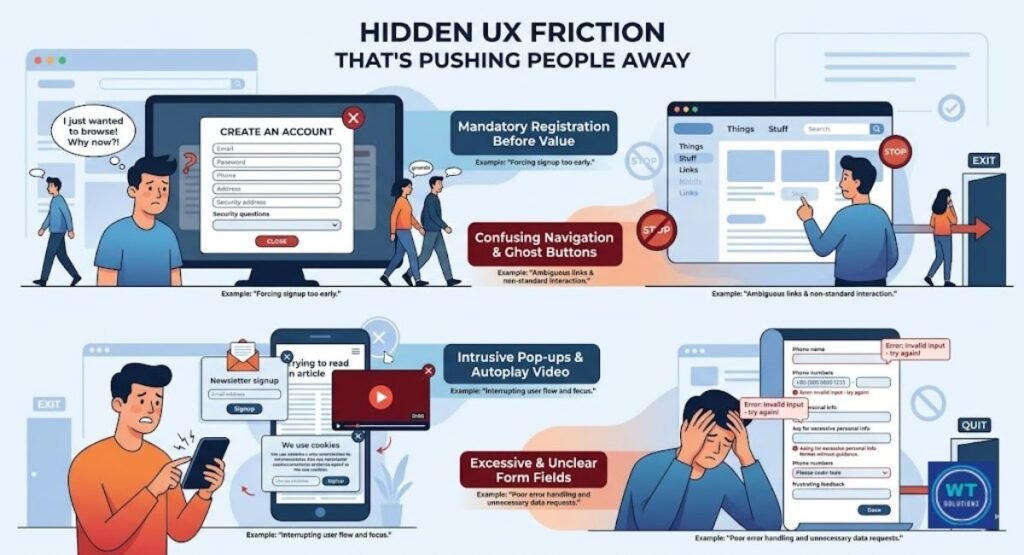
Hidden UX Friction That’s Pushing People Away
The Problem: Too Much Effort, Not Enough Payoff
The results of User Experience (UX) Audits frequently show something unexpected. It’s not always the case that customers don’t like your product. Sometimes people simply find it too difficult to navigate your website. It takes too many clicks to get somewhere. confusing layouts.
pages that take too long to explain themselves. People are discreetly pushed away by this UX friction, and they never tell you why they left. It resembles a store with excellent merchandise but disorganized aisles that make it difficult for customers to find anything.
You can observe what a visitor truly experiences from the time they arrive on your page until they either convert or depart by using user journey mapping. Friction spots become clear when you map that path.
A checkout where creating an account is necessary before making a purchase. Three pages deep was a contact form. An almost impossible-to-tap mobile menu. These seemingly insignificant things can result in significant losses. Time on site, scroll depth, and click patterns are examples of engagement metrics that show where users lose interest.
The Payoff: Easier Journeys, Better Results
Conversions increase when friction is eliminated. The linkage is direct. Experian discovered that businesses with sleek, seamless user interfaces have up to 400% higher conversion rates than those with chaotic, perplexing designs.
You should be stopped in your tracks by that number. More traffic isn’t always necessary. Sometimes all you need to do is make things easy for the users who are already on your website.
You can see precisely where users click, stop scrolling, and become confused with session recordings and heatmaps from programs like Hotjar or Microsoft Clarity. These recordings are priceless.
They transform uncertainty into clarity. You may observe actual visitors interacting with your landing page in real time rather than speculating why it isn’t functioning. In 2026, a flawless mobile experience is also essential. Mobile devices account for almost 60% of all web traffic.
You’re losing the majority of your visitors before they even attempt to use your mobile user experience if it’s flawed.
Messaging That Doesn’t Land
The Problem: People Don’t Get What You’re Offering Fast Enough
Clarity in the value offer is crucial. Convincing a visitor that they are in the right place takes roughly eight seconds. People will leave if your headline is ambiguous, your subheadline is unclear, and the information above the fold doesn’t make it apparent what you do and for whom.
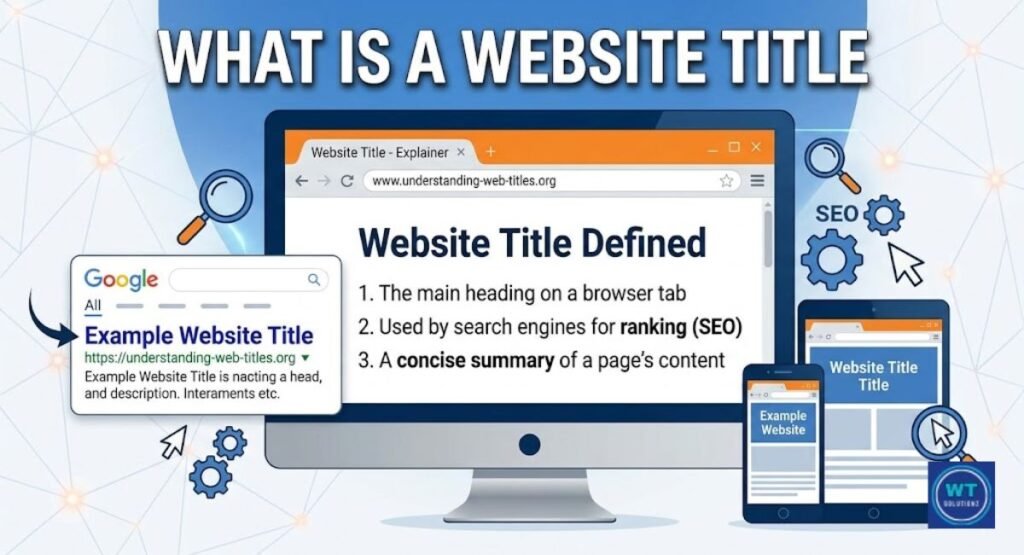
Clarity starts with proper structure, so pay attention to the website title vs H1 tag debate to ensure your main message isn’t lost in technical confusion.
Not because your product is unnecessary for them. But they couldn’t recognize it fast enough. In the digital world, a confusing message is one of the most overlooked silent conversion killers.
This becomes even more important in 2026 because of Search Intent Alignment. When someone searches for “affordable web design for small businesses” and comes across a page that talks about “creative digital solutions” in general, there is a mismatch.
They weren’t looking for the words. Questions are raised by that disparity. Are conversions sometimes destroyed by doubt? When conducting an SEO audit, you should look at the keywords that lead to your pages and ascertain whether the content on those sites actually matches what the visitors expected.
The Benefit: Clarity That Converts
When your message is clear, everything else gets easier. Visitors remain longer. They keep scrolling. Your calls to action are clicked by them. Does the page quickly convince visitors that they are on the right page? This is often the key to reducing bounce rates.
A high-bounce site can become a converting machine with a clear subtitle and a succinct, attention-grabbing headline. There is no need for a revamp. Just use more appropriate language when necessary.
Competitor SEO analysis can be helpful in this situation as well. Look at what your top competitors have to say about their best-performing pages. How are their headlines structured? What do they say about what they have to offer?
You’re not copying them. You’re learning how the market responds. You write a better piece after that. more clear. More accurate. more human. The audit provides you with the data. Because of the writing, you have an advantage.
Weak, Missing, or Misplaced CTAs
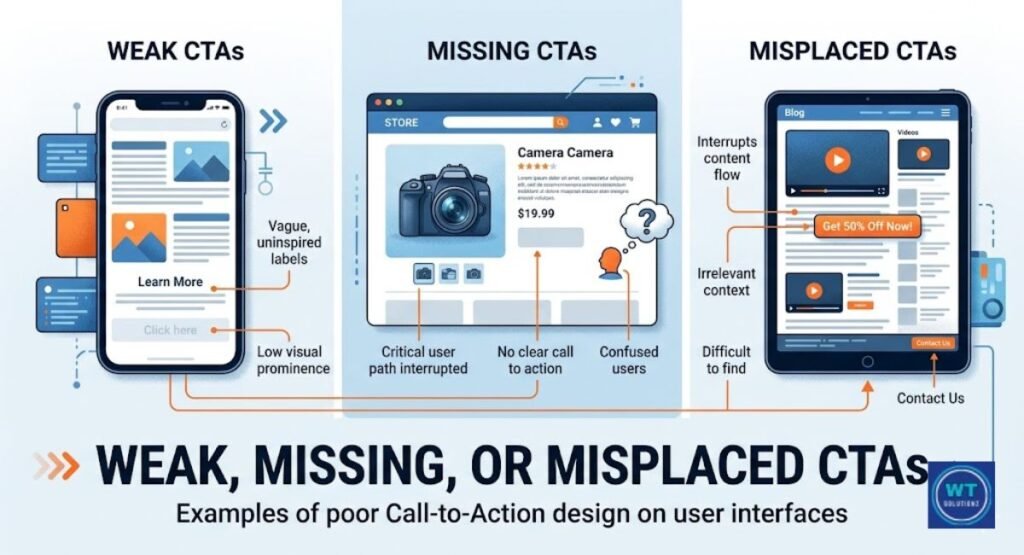
If there isn’t a clear next step, a great page is a dead end. Your Call to Action (CTA) Optimization strategy should answer one simple question for each page: what do you want the visitor to do next? Buy now? Make a phone call? Obtain a guide? Become a newsletter subscriber? Every page must have one primary CTA.
Not five. Not zero. One directive is clear, visible, and focused on taking action. When faced with too many options, people get frozen. When you don’t give them anything, they leave.
The location of your call to action is just as crucial as the wording you use. A call to action buried at the bottom of a 2,000-word page can go unnoticed. Heatmap statistics show that most visitors never get above the halfway point of most pages.
Thus, your call to action needs to be above the fold, in the middle of the page, and again at the bottom. The language must also be exact. The phrase “Get My Free Quote Today” works better than “Click Here.” “Yes, Start My Free Trial” works better than “Submit.” When the CTA is more benefit-driven and focused, it gets more clicks.
| Weak CTA | Strong CTA | Why It Works Better |
| Click Here | Get My Free Audit Today | Specific and benefit-driven |
| Submit | Yes, Send Me the Guide | Personal and action-oriented |
| Learn More | See How It Works in 60 Seconds | Sets clear expectations |
| Sign Up | Join 10,000 Happy Readers | Adds social proof |
| Contact Us | Talk to a Real Expert Now | Creates urgency and trust |
Analytical Tracking (GA4) enables you to track the effectiveness of CTAs on each page. You may monitor click-through rates, conversion rates for each call to action, and even test various wording through trials.
You’re speculating without this information. You can use it to make data-driven decisions that have a real impact.
Cluttered or Confusing Website Navigation
Your website’s navigation structure is its map. No one will be able to locate what they need if the map is unclear. Additionally, customers don’t make purchases when they can’t find what they need. It’s that easy.
Because it doesn’t appear as a clear flaw in a typical SEO report, poor navigation is one of those silent issues that impact every single visitor, yet is rarely corrected. Decision fatigue is increased, and visitors are overwhelmed by crowded navigation menus with an excessive number of items.
The technical name for the arrangement and connections between your pages is information architecture. To ensure that everything is accessible, a quality SEO audit examines your menu depth, page hierarchy, and internal link flow.
To ensure search engines and users can navigate easily, you must understand why are internal links important for SEO and how they guide the user journey
Any page may be accessed from the homepage with two or three clicks thanks to a flat, simple structure. Organizing your pages through a silo internal linking strategy can help distribute authority and make deep content more accessible.
In addition to annoying users, deep, buried pages lose link equity from Google, which lowers their ranks. Improving navigation simultaneously improves your user experience (UX) and organic search results.
Lack of Trust Signals and Credibility Indicators
Customers don’t purchase goods from strangers. They make purchases from companies and individuals they trust. Additionally, social proof and trust signals are used to establish trust on the internet. Reviews, endorsements, certificates, case studies, secure HTTPS connections, privacy guidelines, and money-back promises.
These are the items that reassure an anxious first-time visitor: “You’re safe here.” We are real. Others trust us. Even a highly optimized page won’t be able to convert without them.
Verified customer reviews, industry badges, and media mentions are examples of credibility indicators that have a significant impact. They transfer the burden of evidence from you to your satisfied clients. Conversions can rise by double digits with just one five-star review widget above your call to action.
Google now displays star ratings immediately in search results thanks to schema markup for reviews, which boosts click-through rates before users even get to your page. The audit verifies the existence, placement, and technical implementation of these trust components.
Trust starts in the search results; understanding how meta descriptions impact SEO and organic CTR can be the difference between a bounce and a conversion.
Complex or Frustrating Forms
No one wants to ask a straightforward inquiry by filling out a twelve-field form. One of the most silent conversion killers for lead-generating pages is lengthy, confusing forms. The likelihood that someone may abandon a form rises with each additional field you include.
Reducing a form from eleven fields to four can boost submissions by up to 120%, according to HubSpot research. That’s a huge benefit from a small adjustment. However, the majority of websites continue to employ forms that request far too much information too quickly.
The goal of form optimization is to eliminate obstacles. At that point in the relationship, only ask for what you really need. Later on, you can always obtain additional information. To initiate a conversation, just include your name and email address.
The audit finds your form drop-off spots using Analytical Tracking (GA4) and Session Recordings & Heatmaps. Perhaps users begin filling out the form but stop at the phone number field. On a mobile device, the submit button could be too small. Once you can see these issues clearly, they can be resolved.
Additionally, abandoning form visitors can be saved using Exit Intent technology. A significant portion of lost leads can be recovered with a well-timed pop-up that shows up right before someone is going to leave and offers a more straightforward option or an incentive to stay.
This is optimizing the conversion potential of traffic that you have previously spent to draw in.
Sales Funnel Analysis and High-Intent Keyword Mapping
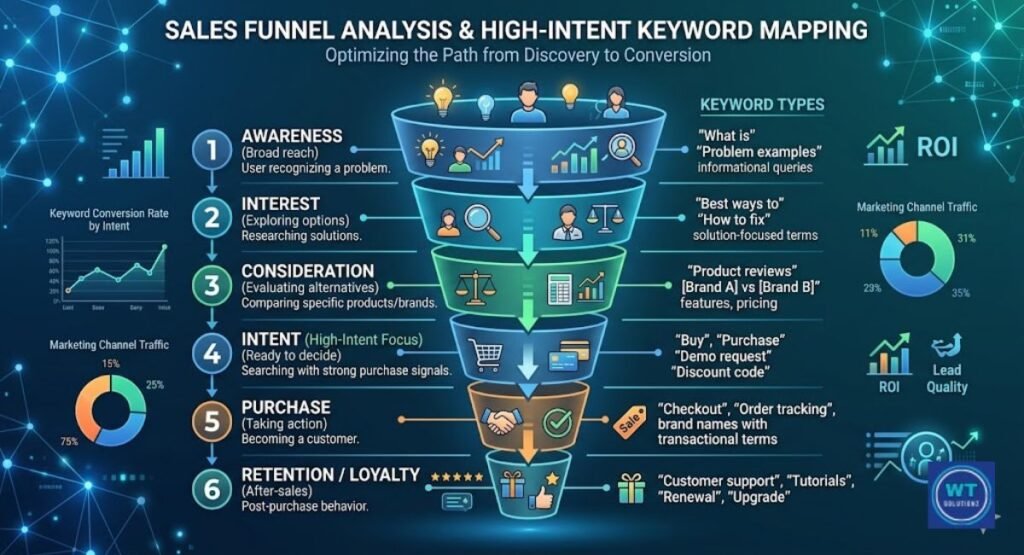
Not every type of traffic is created equal. A visitor looking for “what is SEO” is far from prepared to make a purchase. Right now, a visitor looking for “hire an SEO agency for an e-commerce store” is prepared. The keywords that indicate a desire to purchase are known as high-intent keywords.
Additionally, your audit should determine whether these terms are being targeted by your most conversion-focused pages or whether they are settling for general, low-intent traffic that fills your statistics but drains your budget.
Your content is mapped to the three primary stages that each buyer goes through using sales funnel analysis. At the top is awareness, where people learn about their issues.
In the middle, when they contrast solutions, is consideration. At the bottom, people make a decision about who to purchase from. Your audit determines whether you have compelling content at each level and whether the pages are appropriately linked to allow visitors to flow from one level to the next.
Make sure your bottom-of-funnel pages contain your strongest CTAs and trust signals, and that they target the highest-intent keywords to increase lead generation.
| Funnel Stage | Visitor Mindset | Content Type | Keyword Examples |
| Awareness | I have a problem | Blog posts, guides | “Why is my website not converting?” |
| Consideration | I’m comparing options | Comparison pages, case studies | “best SEO audit tools 2026” |
| Decision | I’m ready to buy | Product pages, landing pages | “Hire an SEO expert for a conversion audit.” |
Gaps that can be filled are shown by competitor SEO analysis at the funnel level. Beyond just writing better, you need to know how to perform a content gap analysis to find exactly what your competitors are doing better than you. You have an opportunity if your rivals have strong awareness-stage content but poor decision-stage material.
Improve the bottom-of-the-funnel pages. Focus on purchasing the missing keywords. Seize the guests who are prepared to take action.
Technical Gremlins and Trust Issues Working Against You
Silent conversion murderers can be found hiding in unexpected locations. Redirect chains confuse search engines and delay page loads. Google is uncertain about which version of a page to rank due to duplicate content.
When a secure HTTPS page serves non-secure HTTP assets, it might cause alarming browser warnings that lead users to believe your website is unsafe. The gremlins are these. Tiny, imperceptible, yet unexpectedly destructive.
These kinds of technical obstacles impact more than just rankings. They subtly yet effectively undermine visitor trust. For the majority of users, a browser security warning is sufficient to promptly dismiss the tab.
People wonder if they clicked the correct link when a page reroutes three times before loading. Using tools like Screaming Frog, SEMrush Site Audit, and Google Search Console, the audit reveals all of these problems. You can eliminate unseen barriers that have been subtly working against you the entire time by rooting out roadblocks like these early on.
This also includes visual components that are not optimized. big, sluggish pictures. videos that crash mobile browsers and play automatically. These are technical issues that directly affect people.
Turning Findings Into an Action Plan
Without action, an audit is just a long list of things that need to be done. What you do next is where the true value lies. After your audit is finished, you will obtain a list of problems that range from minor copy corrections to serious technical mistakes.
Setting priorities based on impact is a wise decision. Resolve the issues that are currently costing you the most conversions. Next, work your way down the list. Improvements to strategic SEO are made in order of urgency rather than difficulty.
When you make decisions based on data, you don’t guess what has to be fixed first. The pages with the highest traffic and lowest conversion rates are displayed in your stats. You should prioritize those pages. Adjust the speed. Make the messaging better.
Include indications of trust. Make the CTA tighter. Next, take a test. Before implementing your modifications across the entire site, you can determine whether they are truly effective using techniques like Analytical Tracking (GA4) and A/B testing. This iterative method transforms a one-time audit into a continuous procedure that maximizes your website’s conversion potential.
| Priority Level | Issue | Recommended Fix | Tool to Use |
| Critical | Slow page load on mobile | Compress images, fix render-blocking JS | GTmetrix, PageSpeed Insights |
| Critical | Missing trust signals | Add reviews, HTTPS badge, guarantee | Trustpilot, Schema Markup |
| High | Weak or missing CTAs | Rewrite with specific action language | Hotjar, GA4 |
| High | Long confusing forms | Reduce to three to five fields | Hotjar Form Analytics |
| Medium | Cluttered navigation | Simplify menu, improve internal linking | Screaming Frog |
| Medium | Poor mobile UX | Improve tap targets, fix layout shifts | Google Search Console |
| Low | Duplicate content | Set canonical tags correctly | SEMrush, Screaming Frog |
Read Also:
FAQs
What Is the Difference Between a CRO Audit and a UX Audit?
A CRO audit identifies drop-off points in your funnel and focuses on the reasons why visitors aren’t converting. A User Experience (UX) Audit evaluates how user-friendly and pleasurable your website is. Although they pose diverse queries, they function best when paired.
Can a Website Audit Improve Lead Generation?
Indeed. A thorough audit helps you generate more leads from your existing traffic by identifying the precise reasons why qualified visitors go without taking any action. More visitors will convert if the quiet conversion killers are fixed, saving you money on advertising.
Should I Mention Conversion Rate in My SEO Audit?
Yes, without a doubt. Your Conversion Rate Optimization (CRO) statistics indicate whether or not your traffic is truly making a difference when it arrives. Incorporating it into your audit establishes a direct link between your SEO performance and actual business outcomes.
Can ChatGPT Do an SEO Audit?
You can examine content for search intent alignment and learn SEO fundamentals with ChatGPT. However, it is unable to perform a true Technical SEO Health Check, collect real-time data, or crawl your website. For that, use specialized tools like Ahrefs, Screaming Frog, or Google Search Console.
What Are the 4 Types of Audits?
Technical SEO health checks, content audits, user experience (UX) audits, and sales funnel analyses are the four primary categories. Every one of them examines a distinct aspect of your website. When combined, they provide you with a comprehensive view of what is and is not functioning.
What Are the Big 5 of Audit?
Technical health, on-page content, backlink profile, Core Web Vitals, and Conversion Rate Optimization (CRO) are the five main audit categories. By addressing all five, you may eliminate challenges in every area of your website. If you miss one, you run the danger of failing to address serious conversion and ranking issues.
The Bottom Line
This is the main point. A business cannot be built on traffic alone. Conversions do. And the only way to find conversion killers with an SEO audit in 2026 is to start asking why your visitors aren’t taking action instead of focusing just on rankings.
Broken forms, sluggish pages, poor messaging, and a lack of trust signals. All of these issues can be resolved. But what you haven’t discovered, you can’t cure. Get your audit underway.
Pay attention to the statistics. Fix the problems. And see how your website begins to fulfill its intended purpose.