If you’ve ever constructed a website and wondered why some pages rank while others just sit there collecting dust, internal links might be the missing piece. You may have the best stuff on the planet. But if your pages don’t connect, Google won’t know where to look.
Neither will your readers. So why are internal links important for SEO? To put it simply, they work like roads on a map. They guide both people and search engine crawlers between pages. They let Google know which pages are most crucial.
Robust internal connections improve your website’s overall information architecture, improve user navigation, boost crawl budget optimization, and support topical authority. Everything is made simpler by this guide.
In 2026, with AI Search (SGE) dominating the landscape, internal links are no longer just for navigation; they are a vital tool for defining your content’s “entity.” We have seen how these links signal to Google exactly how deep and authoritative your expertise really is.
What Are Internal Links?
An internal link connects one page on your website to another page on the same website. If you provide a link from your blog post on “healthy breakfast ideas” to your article about “meal prep tips,” it’s an internal link that functions perfectly.
Think of your website as your house. Each page is a space. Internal links are the hallways that join those rooms.
In the absence of them, visitors enter a room and get stuck. Search engine crawlers are affected by the same problem. Unconnected pages, to put it simply, cannot be located.
Internal Links vs. External Links vs. Inbound Links
These three are frequently mistaken. Here’s a simple explanation to make sure you never mistake them again. Your website is connected to itself using internal links.
External links direct users from your website to other websites. Inbound links, also referred to as backlinks, are links that point to your website from another website.
While internal links are under your control, you must also monitor your site for toxic backlinks that could harm your rankings.
| Link Type | Direction | Example |
| Internal Link | Your site → Your site | Blog post links to service page |
| External Link | Your site → Another site | You link to a Forbes article |
| Inbound Link | Another site → Your site | A blog links to your article |
Because backlinks and internal links serve different purposes, it’s critical to distinguish between the two. Your website’s total authority is raised by backlinks. Internal links distribute that authority to the pages that most need it.
While most internal links should be dofollow, knowing the difference between dofollow vs nofollow links helps in managing link equity.
Types of Internal Links
Not all internal links operate in the same way. There are navigational links in your header and menu. Breadcrumb navigation allows users to see the path they followed to reach a page.
Links that are incorporated into your actual content are the most valuable to search engines.
The contextual importance of a relationship determines its potency. Google learns far more from a link placed inside a pertinent sentence than from one hidden in the footer.
If you give contextual links top priority, your content structure will rapidly improve.
| Type | Where It Lives | SEO Value |
| Contextual Link | Inside body content | High |
| Navigational Link | Header or menu | Medium |
| Breadcrumb Link | Top of page | Medium |
| Footer Link | Bottom of page | Low |
Our Agency Insight: In our recent projects, we observed that connecting cluster articles back to the main pillar page resulted in a 30% boost in indexing speed. This real-world data is a powerful way to strengthen your site’s E-E-A-T signals (Experience, Expertise, Authoritativeness, and Trustworthiness) for Google.
Why Are Internal Links Important for SEO?
This is the real answer. Google’s crawling, understanding, and ranking of your pages are affected by internal links.
When you have a well-linked website, Google can easily see what your content covers and which pages are most crucial.
Without that narrative, Google is forced to make assumptions. Additionally, when Google makes projections, you lose rankings. Because of this, information architecture and astute linking are intimately linked to successful SEO results.
Internal Links Pass Link Equity
Link equity distribution is one of the primary reasons internal links are crucial for SEO. When a strong page on your website links to a lesser page, it shares some of its authority.
This is often called “link juice.” It navigates your website’s internal links.
Think of it like water passing through pipes. Your high-authority pages are the most potent. When you connect from those pages to more recent ones, that power travels wherever you choose.
Some automated internal signals, like pingbacks, can be tricky; learn if pingbacks help SEO or if they might slow down your WordPress site.
A page’s chances of ranking are significantly increased by strong internal links.
Internal Links Help Google Understand the Site Structure
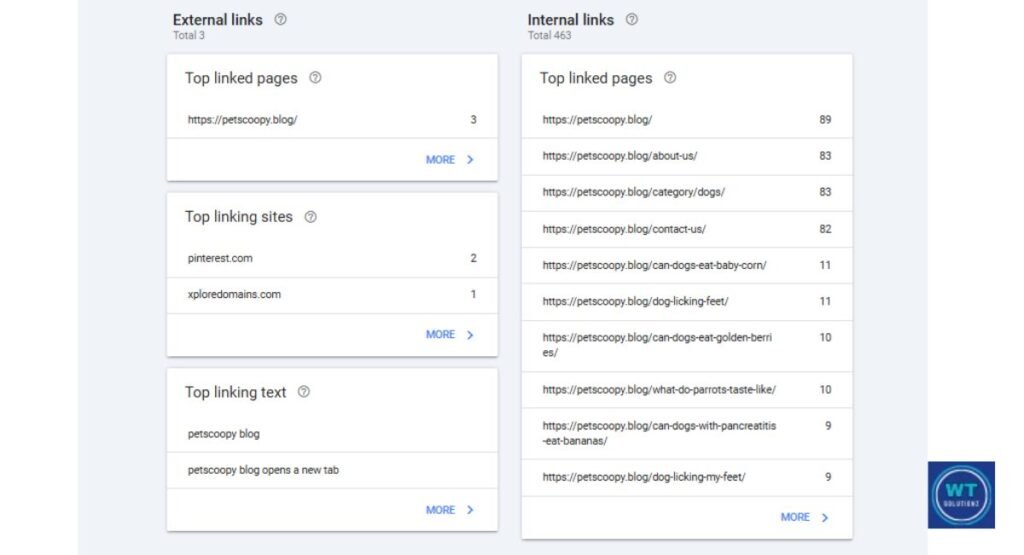
To follow links on webpages, Google uses search engine crawlers. If a page has no internal links connecting to it, crawlers may never find it. No matter how good the content is, it is still invisible.
Your links also highlight the most important pages. A page with twenty internal connections makes a strong statement.
Information architecture and site taxonomy have an impact on how Google interprets your entire website. Your entire website will benefit if you execute this correctly.
Enhanced Crawlability and Indexation
Google has a crawl budget. It only scans a set number of pages on each visit. That money is wasted by inadequate internal connectivity. Crawlers are swiftly directed to your best content by efficient internal linking.
For large websites, crawl budget optimization is essential. Small websites, however, also benefit from this. If your pages aren’t properly linked, they won’t be indexed.
Furthermore, unindexed pages just cannot rank. Crawl efficiency starts and ends with your internal link structure.
Internal links guide crawlers, but to ensure Google sees the full picture immediately, you should also know how to submit an XML sitemap to GSC.
Strengthen Topical Authority and Contextual Clarity
Google now takes into account more than just individual pages. “Does this site truly know this topic?” is the question it poses after examining your entire website.
You establish topical authority when your pages connect around a main theme. Your website is regarded by Google as a reliable authority.
Semantic SEO is useful in this situation. Google can easily understand entity relationships created by linking relevant content.
Depth is indicated by strong semantic linkages between your pages. Additionally, depth is rewarded with higher scores overall.
Building depth isn’t just about linking existing pages; it’s about finding what’s missing. You can use our guide on how to perform a content gap analysis to identify new opportunities for internal connections.
7 Benefits of Internal Linking in SEO
The main reasons internal links are important for SEO are now clear to you. However, the advantages go beyond only rankings.
Strong internal linking improves crawl coverage, increases engagement, and boosts conversions for websites.
Here are seven specific advantages that a well-thought-out internal linking strategy currently offers your website.
01. Enhance the User Experience and Navigation
A one-page visit can be transformed into a thorough site exploration with the use of contextual and navigational International links. Users don’t need to return to Google to find relevant material.
Google keeps a close eye on that since it improves user navigation.
Users remain longer when they browse over several pages. They have more faith in your website. They also have a much higher chance of returning.
02. Improve Engagement Metrics
Your internal links have a direct impact on user engagement metrics like dwell duration and bounce rate reduction.
Your page views per session increase quickly when someone reads a second article after clicking an internal link.
Google keeps a careful eye on these signals. In contrast to a website where visitors depart after 30 seconds, a website where users spend time reading several pages provides a very powerful ranking signal.
03. Drive Users Toward Conversion
Users are automatically moved along your sales funnel by clever internal links. A case study is linked from a blog article. A case study links to a pricing page.
A contact form is linked from a pricing page. Internal connections serve as the road signs on that voyage.
This is the ideal point of overlap between marketing and SEO. You’re doing more than just assisting Google. You’re assisting actual folks in making actual decisions that result in actual sales.
Internal links should lead users to take action. If your traffic isn’t converting, our checklist on how to identify conversion killers through an SEO audit can help you fix the leaks.
04. Distribute Page Authority Across
Your Website: By simply connecting to your high-authority pages, weaker pages might be elevated. This evenly distributes link equity and increases the likelihood that more pages will score well.
05. Help You Rank for More Keywords
Anchor text optimization reinforces the content of the linked page. More pages rank for more specific keywords when the anchor text is more focused.
06. Reduce Orphaned Content
Pages that are orphaned and lack internal links have a very difficult time ranking. By reintegrating isolated pages into the ecology of your website, internal links address this issue.
07. Support Your Content Hub Strategy
Topic clusters, pillar pages, and cluster content are all supported by internal links. Your content hubs just collapse without them. With them, each piece of content makes the entire website stronger.
Crafting a Strategic Internal Linking Strategy
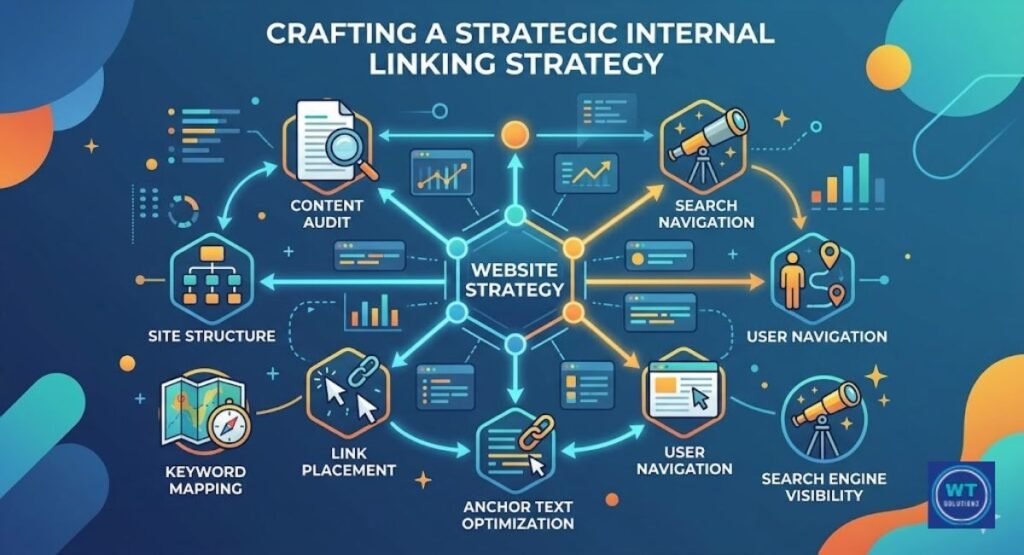
Making thoughtful decisions about which pages to connect and why is part of having a strategy. You’re not adding links at random. You’re developing a system that facilitates easy site navigation for both users and Google.
Fortunately, you don’t need pricey instruments to get started. Every time you publish, you must have a firm grasp of your material and adhere to a few basic guidelines.
Identifying the Main and Supporting Pages
There are cluster content and pillar pages on every website. Large, general topics are covered by pillar pages. Cluster pages delve further into particular, pertinent subtopics.
Linking cluster pages back to pillar pages and pillar pages out to cluster pages is your responsibility.
Make a list of your top five most crucial pages first. Next, consider each other page and determine which pillar it supports. The precise location of your internal links is indicated by that response.
Building Content Hubs
A collection of pages centered around a single subject is called a content hub. In the center is the pillar page. It is surrounded by cluster articles that go into great detail about pertinent subtopics.
The pillar links out to each cluster, and each cluster page ties back to the pillar. Imagine a wheel. The center is the hub. Your cluster articles are the spokes. Google recognizes this structure’s strong topical authority signal with higher rankings for all of your linked pages.
To organize your content effectively, implementing a silo internal linking structure can significantly boost your topical authority.
Using Descriptive, Keyword-Focused Anchor Texts
One of the aspects of internal linking that is most neglected is anchor text optimization. The clickable words on a link are your anchor text.”Click here” doesn’t tell Google anything. However, “internal linking best practices” provide Google with precise information about the content of the linked page.
Understanding the different types of anchor text is crucial for maintaining a natural link profile.
Make sure your descriptions align with the subject matter of the page you are linking to. To make it read well to actual people as well, keep it natural. For each internal connection you create, that balance is the ideal level of contextual relevance.
Keep Crawl Depth at Three Clicks or Less
The number of clicks required to access a page from your homepage is known as page depth. Seldom are pages buried seven or eight clicks deep correctly crawled or indexed.
From your homepage, all of your site’s key pages should be accessible with just three clicks.
Add internal links to bring sites that are buried more than three clicks to the surface.
This directly enhances crawl budget optimization and guarantees that Google always gives your greatest content the attention it merits.
Best Practices for Internal Linking Optimization
What keeps your plan going over time is adhering to the proper daily routines. These guidelines will assist you in keeping an efficient internal linking system that continues to function month after month without breaking down.
Consider these to be your unchangeable internal linking habits. Your site taxonomy and general SEO health will gradually improve if you adhere to them.
Linking to Relevant and Related Content
Link only to pages that are actually relevant to the topic of your article. It makes sense to link to a keyword research article if you’re writing about on-page SEO.
It doesn’t work to link to your contact page in the middle of a technical article.
When Google reads your links, it looks for contextual relevance. Just as important as the anchor text itself are the words that surround your link. Always consider whether this link would be useful to a real reader. If so, include it.
Optimizing the Placement and Context of Internal Links
Links that are positioned in the first half of your article are more likely to be clicked on and have greater SEO weight. Both users and crawlers frequently overlook links buried in the final paragraph.
Put your links inside sentences that provide a clear context. This improves user engagement metrics and fortifies the semantic connections among your pages.
Never refer to a list of links at the bottom of an article as internal linking. There is very little utility in that strategy.
Auditing Your Existing Links: Maintaining a Successful Strategy
An internal link audit takes time to complete. Every three to six months, you incorporate this practice into your SEO regimen. To assess the overall health of your links, use tools such as Ahrefs, Screaming Frog, or Google Search Console.
Check for over-linked pages, redirect chains, orphaned pages, and broken connections. Your crawl efficiency remains strong, and your rankings are shielded from gradual, quiet deterioration when your structure is tidy.
Regular maintenance is key. Before you dive into a deep link audit, it’s helpful to understand the difference between SEO analysis and an SEO audit to choose the right approach for your site.
Fix Your Broken Internal Links
A 404 error is returned by broken internal links. They annoy actual users and squander crawl dollars. Resolve them by changing the URL of the link or creating an appropriate 301 redirect to the appropriate page.
Along with internal audits, it is equally important to fix external broken links to preserve user experience.
The free version of Screaming Frog scans up to 500 URLs and identifies any broken links it comes across. Run it regularly. Fix any broken links you come across. Don’t allow them to gradually harm your SEO in silence.
Fix Any Orphaned Pages
No internal links are linking to orphaned pages. These pages are rarely found by Google, and even when they are, it doesn’t know how to integrate them within your website. Locate relevant information and immediately create a link from it to the orphaned page.
Consider it similar to greeting a new member of a team. An orphaned page ceases to be invisible and begins to contribute to your overall topical authority and rankings once you link it to pertinent material.
Eliminate Internal Redirects and Loops
When Page A links to Page B, which then reroutes to Page C, a redirect chain is created. Every redirect wastes link equity and hinders crawling. Crawlers are sent in circles with no way out by a redirect loop. Both persistently and subtly harm your SEO.
Link straight to the ultimate destination URL at all times. Go through your content and change any links that still point to the old location if you’ve moved or updated a page. This maintains the maximum crawl efficiency.
How Internal Links Influence AI-Powered Search Engines
AI search systems reward websites that clearly define their Entity Relationships. When you connect relevant pages, it becomes much easier for AI models to recognize your expertise, which helps you secure a spot in snippets and AI overviews.
FAQs
Why are internal links important for SEO?
Google finds and indexes your pages with the use of internal links. They convey which content is most important, pass link equity between pages, and enhance crawl efficiency and user navigation. Even excellent material remains unnoticed without them.
How many internal links should a page have?
There isn’t a set rule. Depending on the length of the content, the majority of SEO experts recommend three to ten. Prioritize relevancy above quantity. Each connection should be organic and truly beneficial to the reader.
Does internal linking directly help Google rankings?
Indeed. Robust internal linking strengthens the contextual relevance of your pages, spreads authority, and enhances crawl budget optimization. Pages regularly rank higher than orphaned pages when they have strong internal connections leading to them.
What is the best anchor text for internal links?
Make use of keyword-focused, descriptive words that align with the subject matter of the page you are linking to. Steer clear of “click here” and “read more.” Use terms like “how to fix orphaned pages” or “internal linking strategy” instead.
Do internal links help with AI-powered search in 2026?
Indeed. AI-powered search engines seek out websites with distinct entity relationships and high subject authority. Expertise and depth are indicated by well-linked content. When selecting which sources to display, AI search systems specifically reward certain signals.
Can too many internal links hurt SEO?
Yes, if they’re pointless or coerced. Overlinking confuses visitors and crawlers while diluting the value of each link. Every time, ten excellent, pertinent internal links outperform fifty haphazard ones.
What tools help with internal link audits?
Screaming Frog, Ahrefs, Semrush, and Google Search Console are the most widely used choices. Each one quickly provides you with a clear picture of the state of your internal link.
5-Minute Internal Link Audit Checklist
- Fix 404s: Repair all broken links to ensure a smooth user experience.
- Link Orphaned Pages: Identify pages with no incoming links and connect them to your site structure.
- Break Loops: Eliminate redirect loops (e.g., Page A → Page B → Page A) to prevent crawling issues.
- 3-Click Rule: Ensure your most important pages are accessible within a maximum of 3 clicks from the homepage.
Final Thoughts
Internal links are more than simply a small SEO checkbox, as you now understand. They influence how Google interprets your content, crawls your website, and determines what to rank.
Additionally, they have a direct impact on how each reader interacts with your pages.
In summary, internal linking is one of the most cost-effective and high-return SEO strategies available today. Your top five pages should come first.
Give each one two or three pertinent internal links. From there, build. Strong internal connection techniques are constructed in this way. One meaningful connection at a time.