Most likely, you have previously developed backlinks. However, did you realize that some links improve your rankings while others have no effect at all? It’s accurate. The key distinction is between dofollow vs nofollow links.
Link juice is sent directly to your website via a dofollow link. Google is informed, “This page is worth trusting.” A nofollow link prevents that power from flowing through by adding the rel=”nofollow” attribute to the code. However, nofollow links still promote your business and increase referral traffic.
The first step to a more intelligent link-building approach that genuinely raises your website in search engine results is to comprehend both link types.
Nofollow vs. Dofollow Links: What Is the Difference?
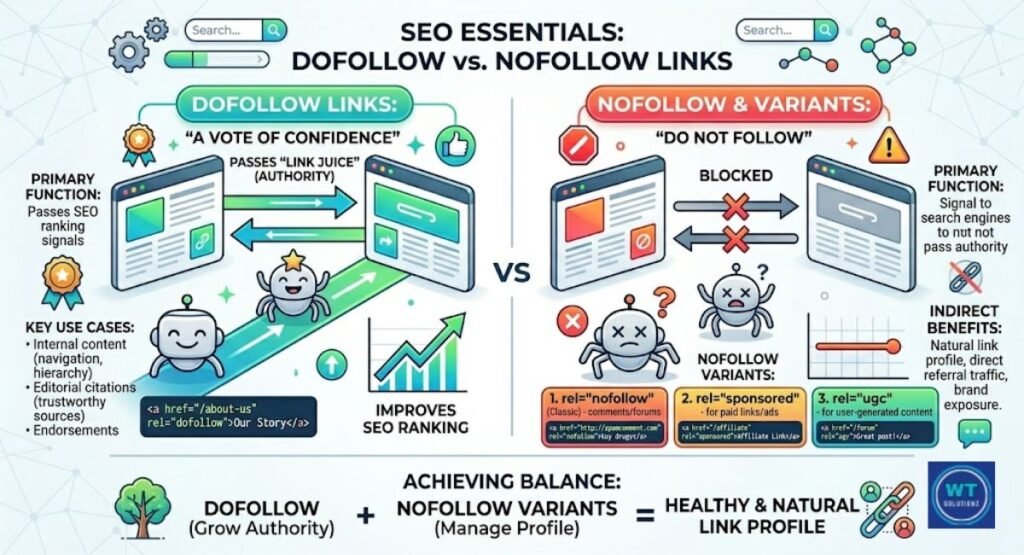
There are two types of links on the internet: dofollow and nofollow. That’s all. A dofollow link is essentially a way for a website to notify Google, “Hey, I trust this site.”
Google pays attention. It transfers link equity to your page by following that link. This improves the search engine results page (SERP) ranking of your page.
A nofollow link functions in a different way. Search engine crawlers are instructed not to pass any ranking power by a short bit of code known as the rel=”nofollow” attribute.
Thus, there is a relationship. It is still clickable. However, it is not regarded by Google as a vote for your website. A clever link-building approach incorporates both types of links. You must comprehend both.
What Is a Dofollow Link?
Dofollow links are like regular links. No unique tag. No further code. Unless you actively modify it, all links added to a webpage are dofollow by default.
Google’s bots follow dofollow links that point to your website, transferring link juice from the linked website to your own. Consider it similar to a popular vote.
Google will trust you more if you receive more votes from reputable websites.
This is the problem. Dofollow links are not all created equal. A dofollow link from a small blog that no one reads has far less weight than one from a reputable news website like Forbes or the BBC.
The degree of authority transfer is directly impacted by the strength of the website that links to you. For this reason, editorial links from reputable websites are sought by all SEO professionals. The needle is moved by them.
How Dofollow Links Help Rankings
Google interprets a dofollow link from a reputable website as a sign of trust. This is how the PageRank algorithm operates.
Every page on the internet is ranked by Google using PageRank, which is based on the number of high-quality websites that connect to it. A higher score is associated with more high-quality dofollow links. Better rankings are associated with higher scores.
Assume you have a blog on fitness. A dofollow link from WebMD or Healthline tells Google that your material is reliable. It’s that easy.
Furthermore, two of the most significant ranking signals that Google now employs are authority and reliability. Getting even one dofollow link from a reputable website will instantly raise your page’s Google ranking.
However, to see the full impact of these links on your site’s health, performing a regular SEO analysis vs an SEO audit is essential.
What Is a Nofollow Link?
A link that has a brief directive appended to the HTML code is known as a nofollow link. The rel=”nofollow” attribute is that instruction. It instructs Google not to follow the link or use it for ranking purposes.
In order to combat spam blog comments, Google implemented nofollow links in 2005. Spammers used to post links all over the place in an attempt to fool the PageRank algorithm. That was halted by Nofollow.
Therefore, nofollow links don’t directly improve your results. However, this does not imply that they are worthless. They continue to generate referral traffic. They are still clicked by actual individuals. They continue to aid in the development of your brand.
A nofollow link from a large website, such as Wikipedia or Reddit, can direct thousands of people to your website. There will always be traffic. Additionally, guests can still become clients.
Rel=”Sponsored” and Rel=”UGC” Link Attributes
To help webmasters be more precise, Google introduced two new link properties in 2019. Well done. These are both sponsored and sponsored.
Google is informed that a link, such as an advertisement or affiliate link, is paid for using the sponsored link attribute. Links in community postings, forums, and comments are under the user-generated content (UGC) category.
Here’s a simple breakdown of all three:
| Attribute | What It Means | When to Use It |
| rel=”nofollow” | Don’t pass link equity | Links you don’t endorse |
| rel=”sponsored” | This is a paid link | Ads, affiliate links, sponsorships |
| rel=”ugc” | User added this link | Blog comments, forum posts |
Using these correctly keeps you in line with search engine guidelines. This is especially important when you start guest posting in 2026, as properly tagging your outreach links protects your site from manual penalties.
What’s the Difference Between Dofollow and Nofollow Links?
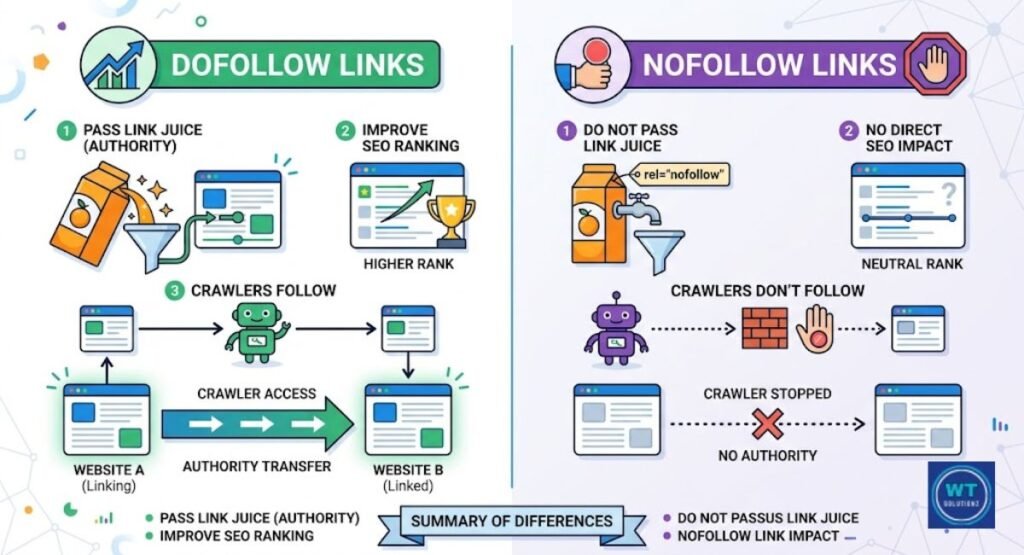
The primary distinction is straightforward. Link juice is passed by dofollow links. Nofollow links don’t. Google uses a dofollow link to help rank your page when it crawls it.
It may or may not follow a nofollow link when it crawls it, but it does not use it as a ranking vote. When developing your link-building strategy, this distinction is crucial.
Consider nofollow links as a mention and dofollow links as a personal endorsement. A personal recommendation of your work is more credible than a casual mention of your name. Both are worthwhile.
However, their methods of operation differ. You may choose where to focus your link-building efforts more wisely if you know which links are followed and which are not.
Key Differences at a Glance
| Feature | Dofollow Link | Nofollow Link |
| Passes link equity | Yes | No (or limited) |
| Boosts PageRank | Yes | No |
| Crawled by Google | Yes | Yes (as of 2019) |
| Helps SEO directly | Yes | Indirectly |
| Affects rankings | Strongly | Weakly |
| Best for | Authority building | Traffic and brand exposure |
Why Are Nofollow Links Important?
Many people wonder, “Why bother with nofollow links if they don’t boost SEO?” It’s a valid question. In actuality, nofollow links are more important than most people realize.
The way nofollow links are handled was altered by Google’s 2019 Google Search Central changes. Google now employs them as a “hint,” rather than a strict guideline. This implies that if it so chooses, it may elect to transmit some value through nofollow links.
That is quite significant.
Additionally, Google finds it strange when a website has no nofollow links. A search engine will scream “link scheme” if all of your links are dofollow.
Social media, news sites, and directories frequently send nofollow links to genuine, organic websites. Thus, you are actually protected by having a mix. It gives your website a genuine appearance.
Healthy Backlink Profile Diversity
A smart SEO strategy usually incorporates a variety of backlink profiles. This entails having a natural blend of dofollow and nofollow links from various kinds of websites. Consider social media, blogs, forums, news websites, and directories.
Google raises an eyebrow if all of your backlinks are dofollow and come from the same kind of website. It begins to appear as though you are manipulating the system.
A natural link profile appears disorganized in a positive manner. Part of maintaining this diversity is identifying and removing toxic backlinks that could trigger spam filters, despite your other high-quality dofollow links
Google actually relies on this untidy variety. It shows that actual people on the internet actually think your material is worthwhile to link to. And you want just that.
Extra Brand Exposure and Referral Traffic
Not to be forgotten is traffic. In a single day, hundreds or thousands of visitors may visit your website via a nofollow link from a well-known Reddit discussion or a Quora response.
That is actual traffic from referrals. Your topic already piques the curiosity of those individuals. They wanted to click, so they did. Additionally, some of them will sign up, buy from you, or distribute your stuff.
Additionally, brand recognition is very high. Your name appears each time someone views your link, even if they choose not to click. This develops familiarity over time.
People have faith in well-known companies. Therefore, dofollow links handle the SEO hard lifting, while nofollow links discreetly do a lot of marketing work. Both must cooperate.
When to Use Nofollow Links?
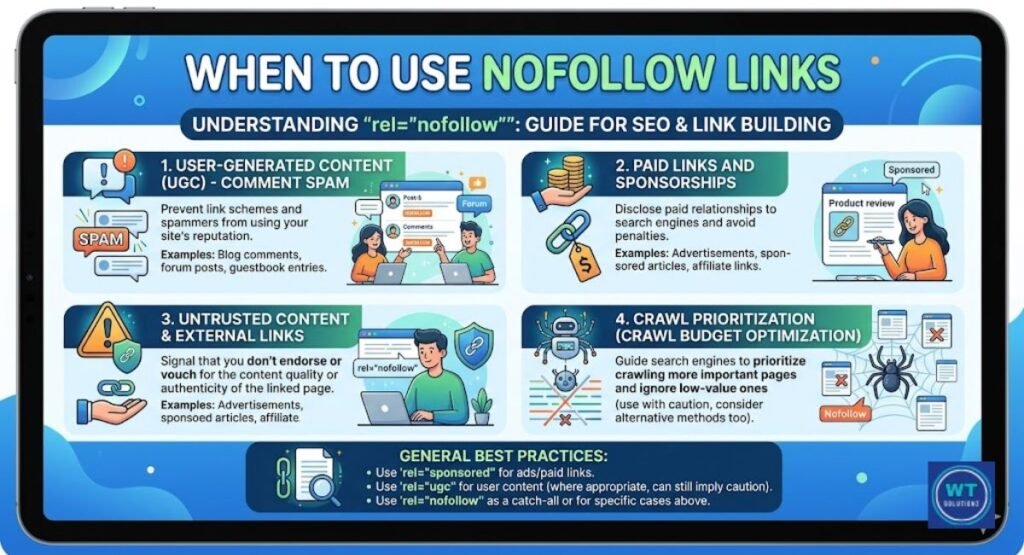
You may avoid Google penalties and maintain the cleanliness of your website by knowing when to include a nofollow tag. Not following every link you add is not necessary.
However, there are some circumstances in which it’s the appropriate decision. Making this properly maintains you in compliance with search engine standards and is a component of a successful link-building plan.
Google will see that you are a responsible publisher if you carefully consider your outbound links. It indicates that you only recommend trustworthy links.
And over time, that level of editorial care increases credibility and authority.
User-Generated Content
Any user-added links on your website have to be nofollow. Links from blog comments, forum posts, profiles, and any link in your website’s community section fall under this category. Why?
since those connections weren’t written by you. You failed to examine them. They were added by someone else. Additionally, some of them may lead to low-quality websites or spamming links.
You can secure your website by adding rel=”ugc” or rel=”nofollow” to user-generated content (UGC) links. Because you identified the links clearly, Google won’t use them against you.
The majority of WordPress plugins, such as Yoast SEO, take care of this automatically. However, it’s still beneficial to understand what goes on behind the scenes.
Endorsed External Websites
If a business paid you to publicize them, provide a sponsored link. Banner advertisements, sponsored posts, affiliate links, and any other link for which you were paid or given a free item fall under this category.
This is what Google demands. It’s not a choice. By properly utilizing the sponsored link property, you can avoid a manual penalty that could instantly lower your rankings.
Consider it to be truthful. Google is being informed, “Yes, this link exists because of a business relationship.” Google acknowledges that. Additionally, it preserves your natural link profile.
Avoid disguising sponsored links as standard dofollow links. The risk is not worth it.
When to Avoid Using Nofollow Links
Nofollow is a helpful resource. It’s not for all links, though. It’s a mistake to apply nofollow to everything. If you’re not careful, it can really negatively impact the performance of your own website.
When you utilize it, you want to be exact. When used improperly, it can cut off crucial signals to Google.
Allowing Google to freely navigate your key pages is a key component of good crawl budget optimization. You squander your crawl budget and confound search engine crawlers attempting to map your website when you block links needlessly.
For Most Internal Links
The links that link your own pages are known as internal links. These are really important. They aid Google in comprehending the structure of your website.
They disperse link juice throughout your site. Additionally, they lead readers further into your article. All of that is prevented by adding nofollow to internal links. Avoid doing it.
Keep your internal links set to dofollow by default. This is the core reason why internal links are important for SEO, as they distribute authority and help Google map your entire website structure effectively.
You are assisting Google and your visitors in finding that content each time you link from your homepage to a blog post or from one article to another.
One of the most frequent and detrimental SEO errors that website owners make without even realizing it is not following internal links. Don’t close those links.
How to Check Nofollow and Dofollow Links
What you cannot see, you cannot control. A crucial component of any backlink audit is understanding how to examine your links, both those that point to you and those that leave your website.
Fortunately, you don’t have to be a technology expert. Right now, anyone can apply these two easy techniques.
You can identify issues early by performing a proper manual link check. Where you would have preferred dofollow links, you may find nofollow ones. Once you’ve audited your link types, ensure Google can find all your pages by learning how to submit an XML sitemap to GSC for better crawling.
Alternatively, you may come across untagged paid links that could result in penalties. In any case, you can maintain things tidy and functioning properly by routinely monitoring your links.
Use the Browser’s “Inspect” Function
Using the built-in inspect tool in your browser is the simplest free method. Simply perform a right-click on any link on a page and select “Inspect” or “Inspect Element.”
The HTML link tag behind that link is displayed in a panel that opens. It is a nofollow link if the anchor tag contains rel=”nofollow”. It’s a dofollow link by default if you don’t notice it. Easy.
Here’s what each looks like in code:
html
<!– Nofollow Link –>
<a href=”https://example.com” rel=”nofollow”>Click Here</a>
<!– Dofollow Link (no rel tag needed) –>
<a href=”https://example.com”>Click Here</a>
This technique is excellent for examining one or two links. However, you’ll need a tool if you have to examine hundreds of links.
Use an SEO Audit Tool
Use a specialized SEO tool for a comprehensive backlink assessment. These programs identify each link as dofollow or nofollow after scanning your whole backlink profile.
Here are the top tools most SEO professionals use:
| Tool | Free Option | Best For |
| Ahrefs | Limited (free account) | Full backlink analysis |
| Semrush | 10 searches/day free | Competitor link research |
| Moz Link Explorer | 10 queries/month free | Quick link checks |
| Google Search Console | 100% free | Your own site’s inbound links |
You can see which websites connect to yours by using Google Search Console, which is free. It’s a good place to start, but it won’t always tell you if a link is nofollow.
How to Manage Nofollow and Dofollow Links on the WordPress Site?
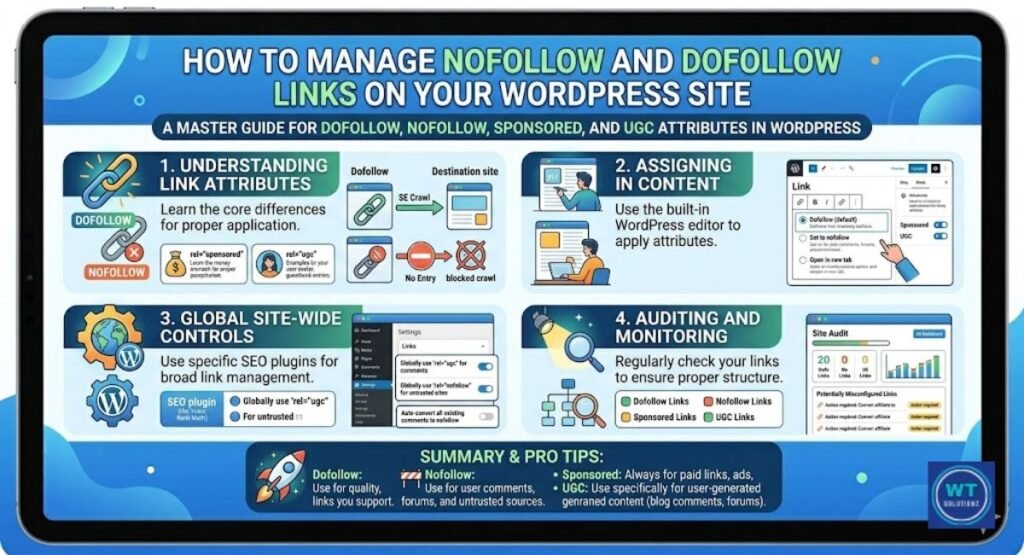
Contrary to popular belief, WordPress simplifies link management. WordPress automatically adds nofollow to comment links by default.
astute. However, unless you utilize a plugin, you will have to manually apply the nofollow tag to additional links within your articles and pages. You can regulate the distribution of your link juice if you know how to accomplish both.
Here’s how to manually add nofollow to a link inside WordPress:
- In the block editor, open the page or post.
- Click on a link to make changes.
- Click the edit button or the three dots next to the link.
- Turn on “Mark as nofollow” if it’s an option on your version.
- As an alternative, insert rel=”nofollow” directly into the anchor tag using the HTML editor.
- Save the page after updating it.
This will be made easier by installing the Rel NoFollow Checkbox plugin. It gives the link editor a simple way to enable or disable nofollow without changing the code.
With Yoast SEO, you can additionally control indexation instructions for specific pages and links. They are both free and highly reliable. Good link management keeps your outbound links clean and your website secure.
The Best Ratio of Dofollow and Nofollow Backlinks
People ask this question all the time. Which ratio works best? The following is the accurate response: Google has never officially confirmed a magic number.
Someone is speculating if they tell you differently. Nonetheless, the SEO community has analyzed thousands of high-ranking websites. Furthermore, most of them show a similar pattern.
Most SEO experts recommend aiming for 60–80% dofollow links and 20–40% nofollow links.
This range frequently mimics a natural link profile when a website builds links organically over time.
This is a general summary:
| Link Type | Suggested Range | Why It Matters |
| Dofollow | 60% to 80% | Passes authority and boosts rankings |
| Nofollow | 20% to 40% | Adds diversity and looks natural |
To be honest, though, focusing on quality is more important than aiming for a specific ratio. One strong dofollow editorial link from a reliable website outweighs fifty nofollow connections from random directories. Make contacts with a goal in mind.
Focus on acquiring authentic links from authentic websites. The ratio will automatically shift into a healthy range when you do that. Additionally, remember that the greatest approach to developing link equity is through relevant, high-quality connections.
FAQs
Are Nofollow Backlinks Bad for SEO?
No. No-follow backlinks don’t hurt SEO. They broaden the backlink profile of your website, boost referral traffic, and raise brand awareness. Don’t ignore them.
Can Nofollow Links Be Crawled by Google?
Yes. Since Google Search Central was modified in 2019, nofollow is considered a hint. Therefore, search engine crawlers may still follow and index a nofollow link if Google decides it is advantageous to do so.
What Is the Difference Between a Nofollow Link and a Nofollow Meta Tag?
A nofollow link only blocks one specific link. A robot’s nofollow meta tag blocks all of the website’s links. Before using it, make sure you have the correct one.
What Is the Difference Between a Dofollow and Nofollow Link?
By transferring link equity, a dofollow link raises ranks. A nofollow link uses the rel=”nofollow” feature and does not pass ranking power. These links are valid and clickable.
What Is Dofollow vs Nofollow?
The default link type, dofollow, instructs Google to follow and interpret it as an indication of trust. Google is instructed by Nofollow not to send link juice via it. It’s actually that easy.
How to Tell If a Link Is Dofollow or Nofollow?
You can right-click on any link and select “Inspect.” Examine the HTML link element for rel=”nofollow. It is automatically dofollow if there is no tag.
Does Dofollow to Nofollow Ratio Matter?
Yes. A healthy natural link profile consists of 20–40% nofollow and 60–80% dofollow links. A fully dofollow profile is considered strange by Google.
Is Nofollow Good for SEO?
Yes. By boosting referral traffic and preserving a clean, diverse backlink profile, nofollow links improve your SEO. They help your website grow even though they have no direct impact on ranking.
Final Thoughts: Balancing Dofollow and Nofollow Links for SEO Success
Both dofollow and nofollow links are crucial in the end. They only serve different purposes. Dofollow links boost your authority, raise your ranks, and transmit link equity via the PageRank algorithm.
You may build your brand, boost referral traffic, and keep a diverse, natural backlink profile with the aid of NoFollow links. Both are essential. You also need to use them properly.
Don’t get obsessed about making every nofollow link dofollow. Focus on acquiring high-quality editorial links from trustworthy, relevant websites. To properly tag your sponsored links, use the sponsored link property.
To protect your website, use nofollow on user-generated content (UGC). To make sure you are always aware of what is pointing to your website, you should also regularly perform a backlink audit.
Start now. Open the Google Search Console. Check the links that are coming in. Look for any sponsored or untagged links that need to be nofollowed.
Next, spend some time getting real, dofollow links from websites that people in your target market visit. If you consistently accomplish that, your ranks will follow.