One day, you most likely noticed an odd notification appear in your WordPress dashboard. You were unaware of the sender of something that was related to your post.
It’s a pingback. And every blogger wants to know do pingbacks help SEO. It’s not an easy response. Depending on how you utilize them, yes. Pingbacks function by automatically connecting blogs using an automated notification mechanism.
They can increase the authority of your domain, provide genuine referral traffic, and eventually help your link-building plan. However, if they are misused, they turn into a spam trap. To help you make the best decision for your website, this post breaks everything down.
What is Pingback?
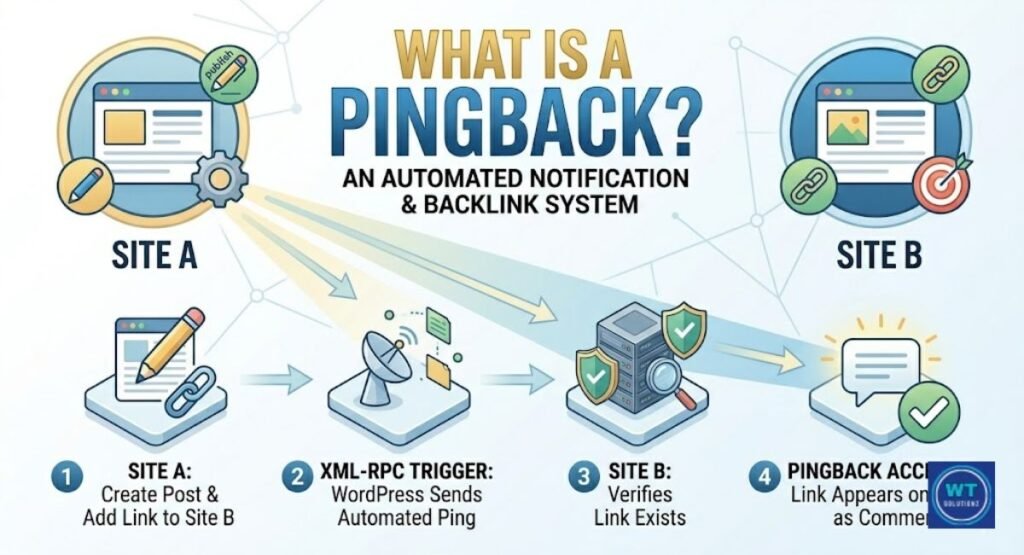
An automated notification sent by one website to another is called a pingback. Site B receives a brief ping when Site A posts something that links to Site B.
Consider it an electronic “knock on the door.” It’s a method for the internet to communicate, “Hey, someone just mentioned you.”
Early on, WordPress included this system. The XML-RPC protocol, which is simply a fancy way of saying that the two sites communicate with one another automatically, is how it operates.
Nothing needs to be done by hand. Behind the scenes, the ping server takes care of everything. It’s a little yet helpful aspect of online blog communication.
Pingbacks and Trackbacks: What Are They in WordPress?
These two terms are sometimes confused by bloggers. They both reside in your WordPress discussion settings and have a similar sound.
However, they are not interchangeable. You may choose which one, if any, is worth keeping enabled for your website by being aware of the differences.
WordPress comes with two built-in blog communication tools: pingbacks and trackbacks. When someone links to your material, they let you know.
However, they approach that task in somewhat different ways. To help you understand what you’re dealing with, let’s examine each one individually.
Trackbacks
The oldest of the two is the trackback. They were the first. You must manually send trackbacks by pasting a unique URL into your post editor.
They are, therefore, manual trackbacks. The issue is that they don’t verify the legitimacy of your connection. The receiving website simply receives a message and is unable to confirm that it originated from a legitimate post. Spammers adore trackbacks because of this gap.
Fake comments are thrown into the comment areas. Nowadays, the majority of SEO specialists believe that trackbacks are not worth the work.
Pingbacks
Pingbacks are more intelligent. They operate entirely automatically. WordPress automatically sends out a ping when a link in your post goes live.
Before anything appears, both sites confirm the link’s legitimacy using the XML-RPC protocol. No manual labor is required. Don’t copy and paste URLs. Everything is initially checked by the system.
Because of this, pingbacks are more reliable than trackbacks. Although they’re not flawless, the system is generally cleaner.
How They Work
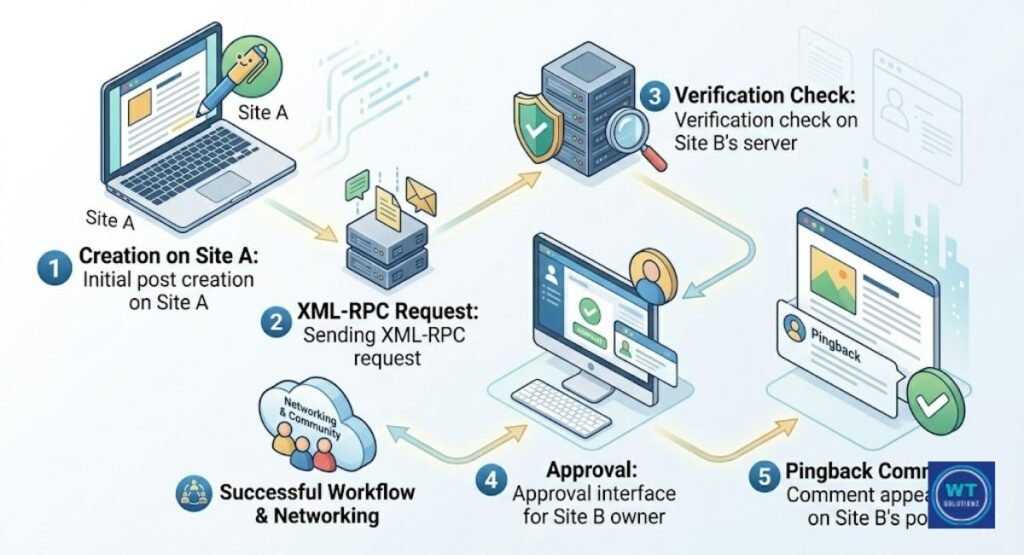
The straightforward, step-by-step procedure for pingbacks in the real world is as follows:
| Step | What Happens |
| 1 | You publish a post that links to another site |
| 2 | Your WordPress site sends a pingback request automatically |
| 3 | The other site’s server receives the request |
| 4 | The server checks that your link actually exists |
| 5 | The other site’s owner can approve or deny requests |
| 6 | If approved, it shows up as a comment on their post |
That’s the entire procedure. Simple and tidy. The work is done for you by the notification system. Additionally, the site owner maintains control by opting to keep an eye on fresh requests prior to anything becoming public.
Are Pingbacks Good for SEO? Here’s What You Need to Know
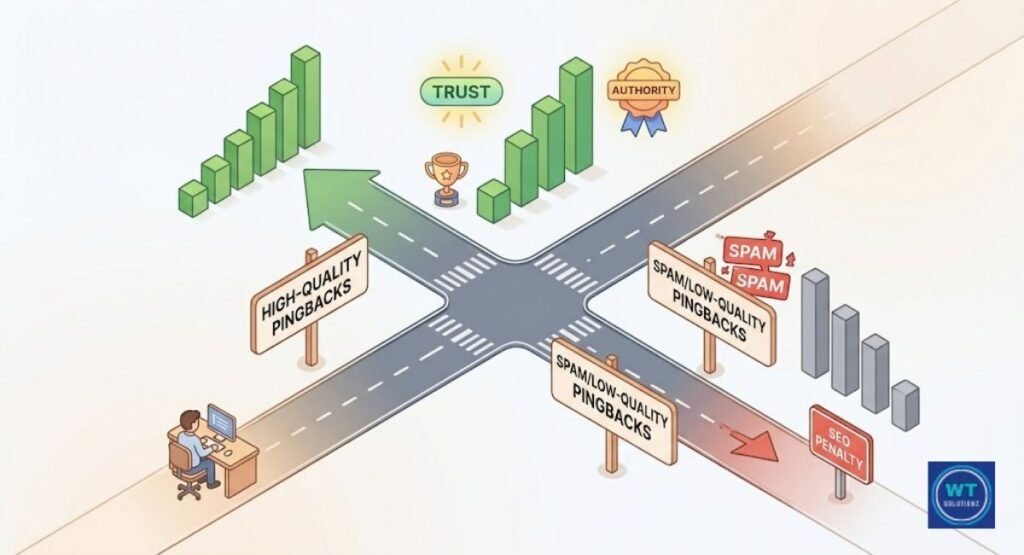
Pingbacks do indeed aid SEO. However, only when they originate from authentic, high-quality websites. Pingback links are handled by Google in the same way as other backlinks.
That ping is significant if the website that links to you has a high domain authority. However, it might actually lower rather than raise your search engine results if it originates from a spammy, low-quality website.
In actuality, Google doesn’t regard pingbacks any differently. The quality of the external links that lead to your website is what counts.
A hundred pings from random spam sites are outweighed by one strong pingback from a reliable blog. Pingbacks do, in fact, aid SEO under some circumstances. However, if they are not managed well, they become a liability. Here, too, nofollow vs. dofollow is important.
The majority of WordPress pingbacks send little to no link juice directly because they are by default nofollow. Nevertheless, they can eventually improve the reputation of your website and generate actual visitors.
The Benefits of Using Pingbacks for SEO
Pingbacks are really valuable when used properly. They are more than just noise from notifications. When you handle them carefully, they can actually help your entire link-building plan.
Here’s what they have to offer.
Maintaining selectivity is crucial. You shouldn’t approve of every pingback. However, the good ones from reliable and pertinent websites can subtly increase your authority while you sleep.
Let’s examine the particular advantages.
Boosting Authority and Credibility
Search engines can tell you are trustworthy when a high-domain authority website pings you. It’s similar to receiving a public endorsement from a person Google already admires. Over time, the relationship between your website and a reliable source increases authority and trust.
Consider it this way: readers and Google both notice if the most reputable voice in your field links to your content. That’s the power of a strategically placed pingback. It’s more than a notification. It gives your content credibility.
Driving Referral Traffic
Pingbacks generate a live, clickable link to a post on another website. It is visible to actual readers. It is clicked by actual readers. Additionally, such clicks become free referral traffic sources. Visibility is free.
When a blogger writes about a subject and includes a link to your more in-depth piece on the same issue, their readers suddenly become your readers as well. That’s a real traffic victory.
Additionally, these visitors typically arrive already interested in what you have to offer, unlike purchased traffic.
Creating a Network Effect
A blogging connection can begin with a single pingback. The owner of the website notices your ping, looks over your content, and may get in touch.
Over time, this results in shared audiences, guest blogs, and more organic external links. A single pingback can lead to much greater networking and involvement. It creates a true sense of community.
This impact is particularly beneficial to small bloggers since it allows them to gain recognition from more well-known figures in their industry without having to spend any money on outreach.
Advantages of Pingbacks and Trackbacks
Pingbacks and trackbacks have several useful benefits outside SEO that are simple to ignore. They were designed to increase connectivity within the blogging community.
Additionally, they perform that task effectively when they operate as designed.
Google rankings are not the only benefit. Building genuine connections, safeguarding your content, and knowing who is discussing you online are some of the biggest reasons to use them.
This is what they actually have to offer.
Establishing Connections and Communication
Pingbacks allow bloggers to communicate and network directly with one another. The website you connected to is now aware of your existence. Real blogging communities develop in this way.
Pingbacks were a major way for bloggers to find each other before social media took over. Receiving a pingback notification still seems like a real introduction in small, specialized communities.
It gives two bloggers an incentive to look at each other’s posts and engage in real discourse that goes beyond the links in the comment section.
Driving Traffic and Building Links
A live link to your material is created with each authorized pingback. It’s a double victory. When readers on the other website click over, you receive a backlink and traffic.
You can receive valuable traffic from blogs with a small readership. A small number of high-quality pingback-generated links eventually become a silent but consistent component of your link-building strategy.
They pile up, but they won’t take the place of an effective outreach campaign. particularly when the connecting website has anchor text that is pertinent to the topic of your page.
Identifying and Combating Negative SEO Tactics
This is one advantage that most people overlook. You can check exactly who is linked to you with pingbacks. This implies that you can quickly identify dubious or subpar websites.
Pingback alerts provide you with an early warning if a bad SEO strategy uses spammy links to target your website. Then, before those links do any actual harm, you may disavow them in Google Search Console.
Consider it an integrated monitoring tool. Although it’s not flawless, it provides you with a warning that more expensive tools like Ahrefs or SEMrush may discover later.
Disadvantages of Pingbacks and Trackbacks
It’s not all sunshine and easy wins with pingbacks. Before you choose to leave them on, you should be aware of their actual drawbacks.
Bloggers who ignore these dangers risk having disorganized comment sections and a tarnished reputation.
Over time, the biggest issues emerge. Readers and search engines perceive a website that doesn’t filter its pingbacks as being careless and even spammy.
What can go wrong is as follows.
Risk of Spam
The main issue with pingbacks is this. For years, spambots have misused the XML-RPC protocol. They attack every WordPress website they come across with thousands of fictitious pingback requests.
Junk links from websites you’ve never heard of quickly clutter your comment area. It requires actual time and effort to moderate spam. Additionally, if you don’t keep an eye on it, Google may perceive your website as accepting low-quality connections from the comment section.
Your search engine rankings suffer as a result. It’s a significant risk. For this reason, a lot of SEO experts advise completely disabling pingbacks.
In fact, heavy spam can also impact your server performance; you can learn more about whether do pingbacks slow WordPress in our technical breakdown
Self-Pings
This one just irritates me. WordPress occasionally sends you a pingback when you link to your own posts on your own website. You are sending yourself a self-pressing notification.
It doesn’t add anything. It just adds unnecessary alerts to your WordPress dashboard. But the answer is simple. A small plugin like “No Self Pings” fixes it in a matter of seconds.
Nevertheless, you will continue to get pings every time you employ clever internal linking in your own material if you are not aware of it.
Time-Consuming Moderation
Every pingback must be examined by a human. You have to monitor new requests, evaluate the quality of the connected website, and then decide whether to approve or deny each request separately.
In a crowded place, that process takes an unexpectedly long time each week. Most bloggers are unaware of this. They return to a massive queue of spam mixed with a few valid ones after activating pingbacks and ignoring them for a month.
It is a waste of time not to have a system in place.
Limited Communication
You are connected to someone when you receive a pingback. That’s all. The context is not revealed. It doesn’t really start a conversation. Compare that to a genuine email outreach where someone offers to collaborate with you and explains how they found you.
A pingback is a tap on the shoulder rather than a handshake. As a blog communication medium, they are rather thin. They opened doors back in 2005, when blogging was still in its infancy.
These days, a quick message on LinkedIn or a reply on Twitter can develop real ties between content providers much more successfully.
Impact on SEO and the Possibility of Exclusionse
Most WordPress pingbacks are, by default, nofollow links. This suggests that they don’t provide your website with many direct links. No-follow links are not given the same weight in search engine rankings as do-follow links, despite the fact that they are theoretically visible to Google.
As a result, the direct SEO value of a typical pingback is minimal. You should be conscious of that fact before attempting to manage them. The nofollow vs. dofollow controversy is important in this case.
If you expect pingbacks to raise your ranks dramatically through link equity alone, you will be disappointed.
This does not, however, mean that they have no impact on a website’s exposure. Referrals are the source of actual traffic. Furthermore, a high-quality website that regularly pings you establishes a pattern of relationship that search engines eventually notice.
Ignoring the spam component is more dangerous. Websites that readily accept pingbacks of poor quality start to resemble hubs for harmful links. Google can and does take that into account.
Several SEO gurus suggest going to the WordPress discussion settings and fully unchecking them if you don’t have a strategy in place to effectively handle pingbacks.
High rank exclusion is made possible via ignored spam queues.
Best Practices for Utilizing Pingbacks Effectively
The best strategies to use pingbacks may be summed up in one word: moderation. Don’t just switch them on and walk away. Regularly check your WordPress dashboard and treat each pingback as a request for a backlink to your website.
Because that’s exactly what it is. Before you approve anything, visit the website that sent you a ping. Analyze the content’s quality. Verify whether it is actually linked to your material with pertinent anchor text in an authentic article, or place your URL in a spam page.
Immediately begin utilizing a plugin like Akismet. Most spam pingbacks are automatically identified before they reach your moderation queue.
That alone saves hours each month. Additionally, think about restricting pingbacks to your most important evergreen items rather than permitting them on every page of your website. As a result, there is less noise. Furthermore, don’t forget to review your WordPress discussion settings every few months.
The spam industry is always changing. You might not be able to use what worked for you a year ago. A little routine maintenance goes a long way.
| Best Practice | Why It Matters |
| Use the Akismet anti-spam plugin | Blocks most spam pingbacks automatically |
| Check the linking site before approving | Protects your site’s reputation |
| Disable self-pings with a plugin | Cleans up your WordPress dashboard |
| Review pingback settings every few months | Keeps your defenses current |
| Only enable on key pages | Reduces spam volume significantly |
Common Mistakes to Avoid When Using Pingbacks
The most common mistake committed by bloggers is to approve every pingback without checking the source. It appears to be beneficial. The queue clears.
But you recently added a dozen links from dubious websites to the comment section of your posts. Google knows about those. They also progressively undermine your credibility and trust in search engines.
The second worst mistake is to ignore the moderation queue for weeks at a time. The system isn’t working in your favor if there is a backlog of pingbacks that haven’t been reviewed.
Another mistake is to assume that each pingback means a real user visited your website and found your material interesting. Most people don’t. Many of them are automated.
Bots send pingbacks to thousands of websites using the XML-RPC protocol without human involvement. If you interpret every ping as genuine praise, you will make poor decisions about what to approve of.
Finally, running pingbacks without any anti-spam security is like leaving your front door open in a dangerous neighborhood. Install protection first. Next, assess whether the benefits of the system exceed the disadvantages for your specific website and target market.
Is it Still Relevant to Use Pingbacks and Trackbacks on WordPress?
Are pingbacks still relevant in 2026? For small blogs in tight-knit specialty communities, they do still have some value.
If you run a personal blog and other bloggers in your community regularly link to each other’s work, pingbacks keep you updated. They offer a sense of unity that is frequently hard to replicate on social media.
In some contexts, they promote genuine and beneficial networking and connections. However, you need to be willing and have the time to effectively manage them.
Larger sites require a different computation. Spam moderation is a full-time job in and of itself due to the volume of spam that comes with a large website.
The link juice from nofollow pingback links does not justify the effort. Additionally, thanks to modern technology like Ahrefs, Google Search Console, and social listening services, you already know who is discussing and linking to you online.
Consequently, the monitoring function that pingbacks initially offered is now provided by enhanced technology. To be honest, in 2026, pingbacks are a specialized tool. advantageous when managed appropriately. The majority of folks don’t require it.
The Future of Pingbacks in SEO and Traffic Generation
Pingbacks are an antiquated technology. They were made for a blogging environment that was very different from the contemporary internet. The Content Management System (CMS) environment was simpler back then, and blogs were the main online platform for exchanging ideas.
These days, content is shared via YouTube, podcasts, social media, and newsletters. Pingbacks have mostly been supplanted by these more modern platforms as a way to promote relationships between artists.
The ping server system is still functional in theory. But the local community has seen a significant transformation.
However, pingbacks continue to occur. They are still included in WordPress. In certain fields, especially academic, technical, or long-form blogging groups, they also continue to provide substantial networking and engagement among writers.
For pingbacks, growth is not the way of the future. It’s also not a complete extinction, though. They will likely remain a background feature of WordPress for many years to come, actively used by a small number of bloggers who genuinely value them.
However, most website owners think that real relationship-based link development techniques, clever internal linking, and high-quality outbound links, rather than automated pings, are the way of the future.
FAQs
Are pingbacks good for SEO?
Yes, but only if they come from trustworthy websites. A high pingback increases the site’s trustworthiness and produces real referral traffic sources. A spammy one, however, could rapidly depress your search engine rankings.
What is the difference between a pingback and a trackback?
Trackbacks were created by hand and are older. Because they don’t verify the authenticity of links, they are easily exploited by spammers. Automatic pingbacks use the XML-RPC protocol to first confirm the connection.
Should I enable or disable pingbacks in WordPress?
If you moderate regularly, turn on pingbacks for significant posts. If you’re too busy to regularly visit your WordPress dashboard, just disable them under Settings, then Discussion.
Do pingback links count as backlinks?
Yes, but most of them are nofollow links by default. They pass very little link juice directly. Think of them as a tool for generating traffic rather than a crucial part of your link-building strategy.
How do I stop pingback spam?
Install Akismet right away after turning off pingbacks in your WordPress discussion settings. Then, monitor new requests frequently to stop spam from happening again.
Final Thoughts
Finally, pingbacks are a little but an important part of SEO and blogging. They’re not enchanted. They are not useless, though.
Do pingbacks help with search engine optimization? Yes, as long as they come from reliable websites and are handled properly. No, when you ignore them and let spam take over. They are useful for building communities on small blogs.
For busy websites without filtering resources, it makes more sense to disable them. Check your WordPress discussion settings to choose the best choice for your website right now.