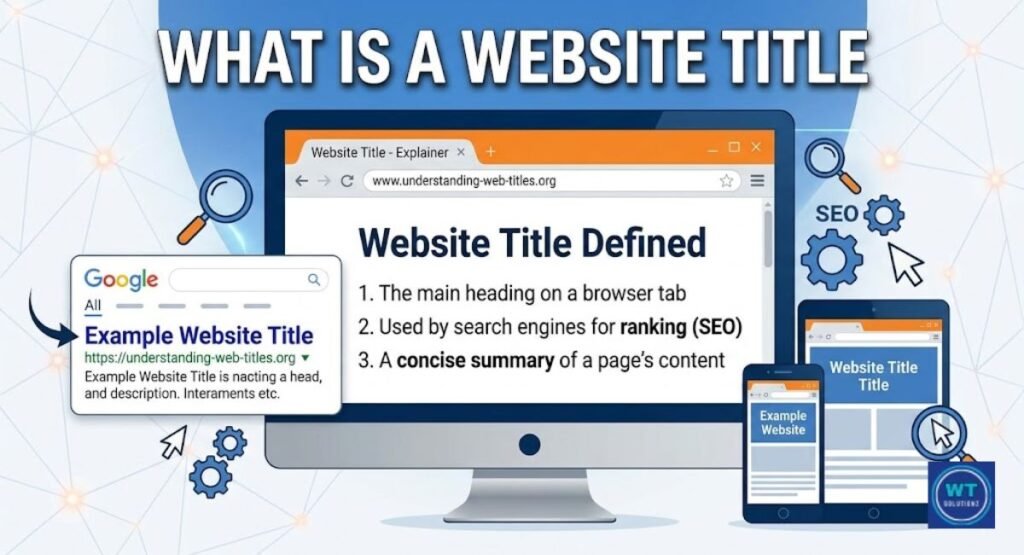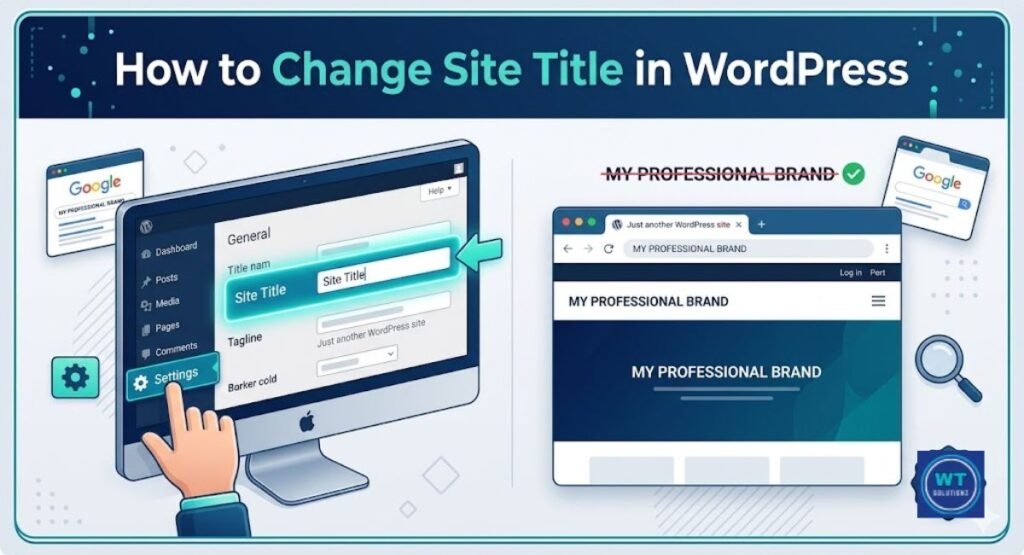
SEO best practices for website titles mean writing clear, keyword-rich titles under 60 characters that match what users are searching for. Your title tag tells Google what your page is about. A good title improves your search engine rankings and gets more people to click on your link. Before diving into the strategy, it is essential to understand what is a website title and its role in digital marketing.
Google looks at your title tag first. Additionally, a real human will view it before clicking your link. Additionally, the majority of website owners do it entirely incorrectly.
Your page can move from rank 9 to position 3 with a compelling title. No matter how wonderful your content is, it might be buried by a weak one. The quality of your titles has a significant impact on search engine rankings.
The SEO best practices for website titles that will be effective in 2026 are covered in this guide. You will discover the ideal length, where to put your keywords, and how to quickly increase your click-through rate.
What is a Title Tag and Why Does It Matter for SEO?
The HTML head portion of your webpage contains a tiny piece of HTML code called a title tag. If you are coding a site manually, you need to know exactly where to put the title tag in HTML to ensure search engines can crawl it correctly. It explains to users and search engines the purpose of your page. On Google’s search results page, it appears as the blue clickable link. When you visit a website, it also appears in the tab of your browser.
It’s more than just a term for your meta title. It is a signal for ranking. In order to comprehend your page, Google reads the title. Therefore, Google might not rank your page for the appropriate searches if your title is ambiguous or omits your main keyword. Additionally, a compelling title increases your click-through rate (CTR), which indicates that more people click on your link than on those of your rivals.
Where your title tag appears:
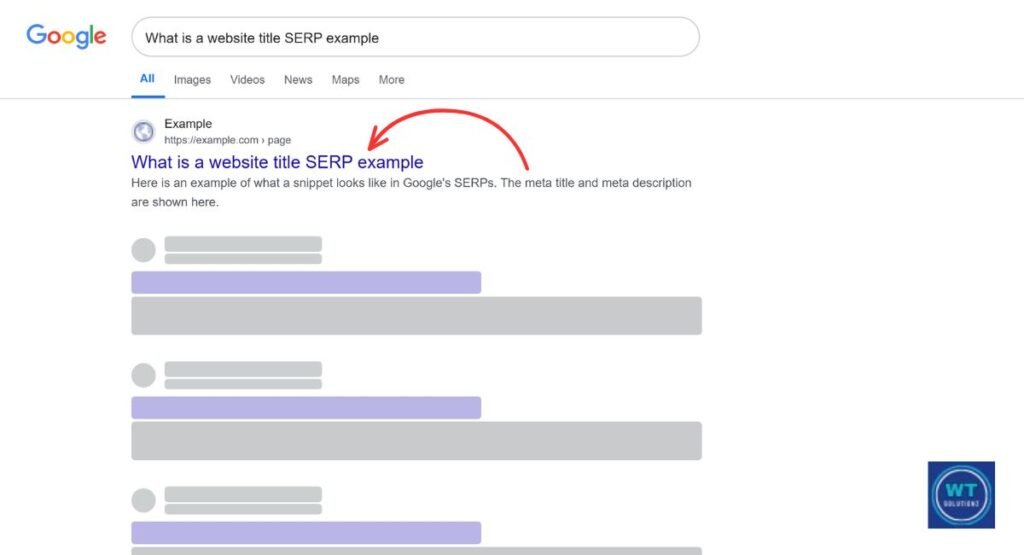
- On the SERP (Search Engine Results Page), there is a blue clickable link.
- At the top of the screen is the browser tab.
- Snippet preview with SEO tools such as Yoast or Rank Math, and social media previews when your link is shared
Expert Insight by Aliya Shehzad: After setting up their website, most novices never touch their title tags again. They utilize the standard page name, such as “Home” or “Page 1.” They could lose hundreds of clicks per month as a result of that one error.
The Anatomy of a Perfect SEO Title (The 60-Character Rule)
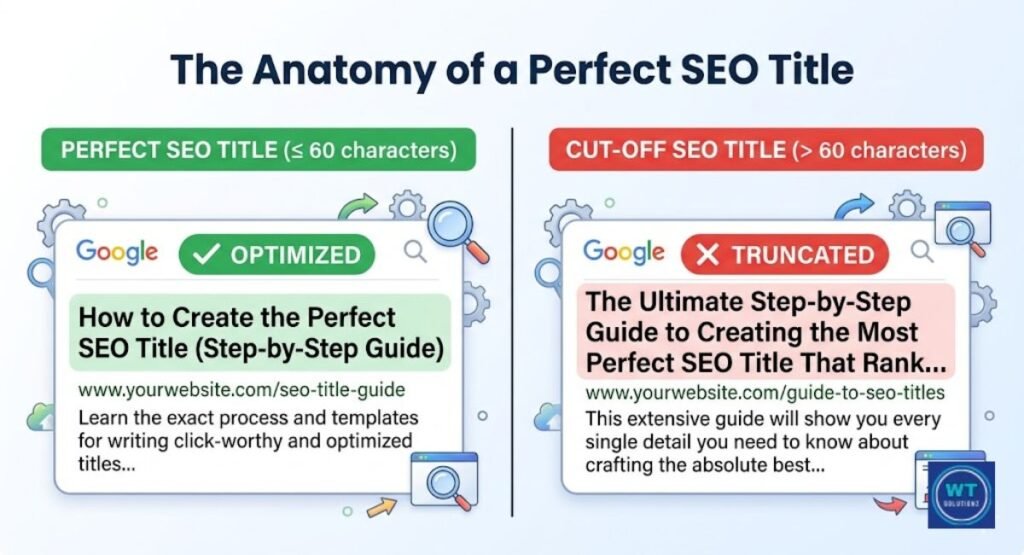
An ideal SEO title accomplishes three things. It contains your main keyword. It doesn’t exceed sixty characters. Additionally, it encourages an actual human to click. That seems easy. However, mastering all three requires practice.
Google removes overly long titles. Users notice “…” at the end of your title when it is chopped. That lowers your CTR and gives the impression that your listing is amateurish. For most titles, it’s a good idea to keep the character count under 60. As we will discuss next, certain SEO tools employ pixel width rather than character count.
Good title vs. bad title example:
| Type | Example | Character Count |
| Too long | SEO Best Practices for Website Titles That Will Help You Rank Higher on Google in 2026 | 87 characters |
| Too short | SEO Title Tips | 14 characters |
| Just right | SEO Best Practices for Website Titles (2026) | 45 characters |
Pixel Width vs. Character Count: Finding the Sweet Spot
Characters are not actually counted by Google. Pixel width is measured by it. In desktop search results, Google permits a title of about 600 pixels. The issue is that the size of each letter varies. The width of the letter “W” is more than that of “i.” Therefore, a 58-character title with a lot of wide letters could still be truncated.
Using a snippet preview tool is the safest course of action. Before you publish, you can see exactly how your title appears in Google using tools like Mangools SERP Simulator. Generally speaking, you should aim for 50 to 60 characters. Additionally, always use a preview tool to double-check titles with a lot of letters.
Quick pixel width facts:
- The Google desktop limit is approximately 600 pixels.
- Google mobile limit: 480–500 pixels, a little bit shorter
- 50 to 60 characters is the average safe character count.
- W, M, and G are the widest letters (they consume more pixels).
- i, l, t, and f are the narrowest letters (require fewer pixels).
Mobile vs. Desktop: How Titles Appear on Different Devices
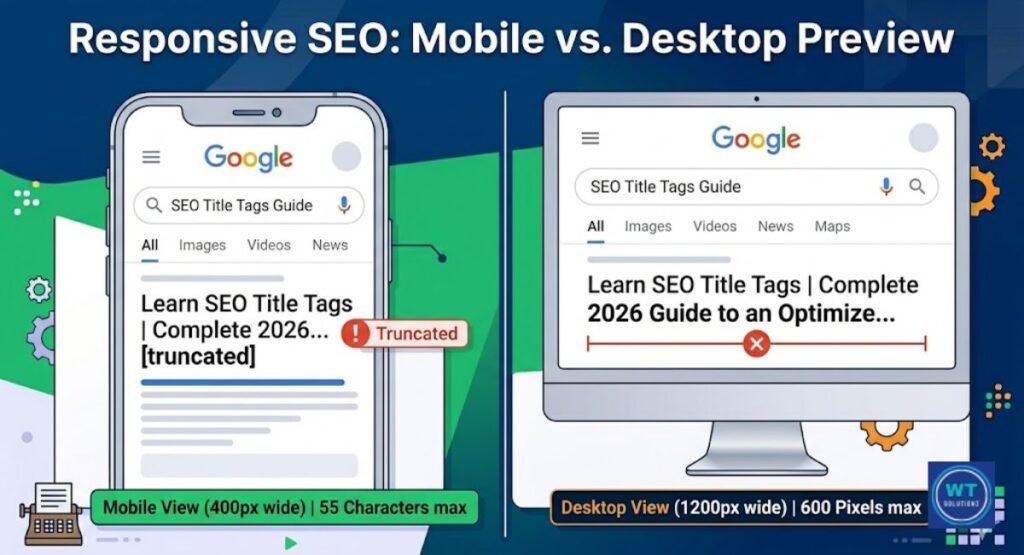
On a laptop, your title appears differently than it does on a phone. Smaller screens are found on mobile devices. Thus, on mobile devices, Google shortens titles even further. On a phone screen, a title that appears flawless on a PC can display “…”
Over 60% of Google searches take place on mobile devices. Thus, you have to start writing with mobile consumers in mind. The first 50 characters should contain your most crucial words, including your main keyword. In this manner, the most helpful portion of your title is always visible to mobile readers.
Tip: Before you click publish, test each headline on a mobile SERP preview. On a phone, something that appears excellent on your laptop might not look good.
Strategic Keyword Placement: Where to Put Your Main Keywords
It matters where your keyword appears in the title. Words that come at the beginning of the title are given higher weight by Google. We refer to this as front-loading keywords. It is therefore usually wiser to start your title with your primary keyword.
For businesses targeting specific regions, using location-based page titles is a proven way to dominate local search results.
Compare these two titles:
- “Complete Guide to SEO best practices for website titles”
- “The Complete Guide to SEO Best Practices for Website Titles”
The keyword is front-loaded in the second one. It immediately lets Google know what the page is about. Additionally, users who search for that term see it right away, increasing your click-through rate.
Keyword placement rules to follow:
- If at all feasible, include your main keyword in the first three to five words.
- Don’t force your keyword; use it organically.
- Avoid using the same keyword more than once in the same title.
- After the keyword, add a hook or secondary benefit.
- Unless you are on the homepage, do not begin with your brand name.
Expert Insight: On one website, the target term was shifted from the middle to the front of the title tag. The page moved from position 11 to position 4 in just six weeks. Nothing else was altered. The only thing that worked was keyword placement.
How to Write Click-Worthy Titles (CTR Optimization)
Getting on page one is just half the fight. Your rating is meaningless if no one clicks on your link. Google is not the only factor in title tag optimization. Making actual people want to click on your link instead of the other nine items on the page is the goal.
Something must be promised in your title. It must address a query, respond, or pique interest. Write your title with your reader’s desires in mind. A title that directly addresses the reader’s issue will always be superior to one that is dull and uninteresting. To stand out from the competition, you must learn how to write catchy website titles that spark curiosity while staying relevant.
Using Power Words (e.g., “Proven,” “Ultimate,” “Fast”)

Words that evoke strong feelings are known as power words. They provide the impression that your title is more intriguing and worthwhile. Words like “proven,” “ultimate,” “fast,” “simple,” and “exact” provide the impression that your page is unique.
However, exercise caution when using them. Each title only needs one power word. If you use too many, your title will appear spammy.
Top 10 power words for titles:
| Power Word | Why It Works |
| Proven | Builds trust and credibility |
| Ultimate | Suggests the most complete resource |
| Fast | Appeals to people who want quick results |
| Simple | Attracts beginners and busy readers |
| Exact | Promises precision and specificity |
| Free | Everyone loves free information |
| New | Triggers curiosity about fresh content |
| Best | Implies top quality |
| Step-by-Step | Promises clear, easy instructions |
| Complete | Suggests nothing is left out |
The Role of Numbers and Brackets in Titles
Titles with numbers receive more clicks. It really is that easy. “7 Ways to Improve Your Title Tags” is a better title than “Ways to Improve Your Title Tags” every time. The brain knows exactly what to anticipate because of numbers. Generally speaking, odd numbers like 7, 9, and 11 outperform even numbers.
Brackets increase CTR as well. You can provide viewers with additional context by ending your title with [2026], [Free Guide], or [With Examples]. Titles with brackets receive up to 38% more clicks than titles without them, according to HubSpot and Outbrain studies.
Title format CTR comparison:
| Title Format | Estimated CTR Boost |
| Plain title | Baseline |
| Title with a number | Up to 36% higher |
| Title with brackets | Up to 38% higher |
| Title with a power word | Up to 20% higher |
| Title with number + brackets | Up to 45% higher |
Matching Search Intent: Giving Users What They Actually Want

The purpose of a search is known as its search intent. Someone wants a particular kind of result when they enter a Google query. They may wish to purchase something, find a certain website, or learn something. Google won’t rank your page for it unless your title reflects that goal.
Searcher behavior and search intent can be divided into four categories:
- Informational: The user wants to learn (e.g., “how to write title tags”)
- Navigational: The user wants a specific site (e.g., “Yoast SEO login”)
- Transactional: The user wants to buy (e.g., “buy SEO plugin”)
- Commercial: The user is comparing options (e.g., “best SEO tools 2026”)
Your title should sound like a how-to guide if your page is one. Your title should evoke a purchase decision if it’s a product page. Even with excellent content, one of the main reasons pages don’t rank is mismatched intent.
Expert Insight: The headline of a blog post was modified from “Content Marketing Services” to “How to Build a Content Marketing Strategy (Step-by-Step Guide).” In just eight weeks, rankings went from page 4 to page 1. The text remained unchanged. The title alone did. It all came down to intent matching.
Simple 3-step intent check before writing your title:
- Look at the top 5 results when you search for your term on Google.
- Find out if these are comparative articles, product pages, or guides.
- Compose your title to reflect the current rating.
Branding Your Titles: When to Include Your Company Name
Trust can be increased by including your brand name in your title. Users are more likely to click on your link if they are familiar with your brand. However, brand name positioning is quite important. If you place it incorrectly, your rankings will suffer.
The overall rule is straightforward. Put your brand name last and your main keyword first. To divide them, use a separator such as a pipe symbol (|) or a hyphen (-). For instance: “SEO Best Practices for Website Titles | YourBrand.” This maintains your brand’s visibility and your keyword at the top. Your brand name may appear first on your homepage, which is the lone exception.
Brand consistency in title formatting:
| Page Type | Recommended Format |
| Homepage | Brand Name – Tagline or Main Keyword |
| Blog Post | Primary Keyword: Descriptive Title – Brand |
| Product Page | Product Name + Key Benefit – Brand |
| Category Page | Category Keyword – Brand |
| Landing Page | Keyword + Power Word (No brand needed) |
Unique Titles vs. Duplicate Content: A Critical SEO Warning
Search engine rankings are silently destroyed by duplicate titles. Google becomes puzzled when two or more pages on your website have the same title. It is unsure of which page to rank. Therefore, it might rank the incorrect one or neither of them.
E-commerce websites are particularly prone to this. The meta title of product variations, filtered pages, and category pages is frequently the same. Additionally, WordPress may produce the same title format for dozens of posts if your blog employs basic layouts. You must always make each title distinct.
Case Study: More than 200 pages at an online store shared duplicate title tags. Within three months of making each one unique and keyword-specific, organic traffic rose by 47%. Google began properly indexing and ranking the appropriate pages.
How to find duplicate titles fast:
- Go to Coverage or Pages in Google Search Console.
- Use Screaming Frog to perform a site crawl (free up to 500 URLs)
- Look for duplicate tag alerts using Yoast or Rank Math.
- Search site:yourwebsite.com “exact title here” in Google
Why Google Changes Your Title (And How to Prevent It)
You might be surprised to see how frequently Google modifies title tags. According to a 2021 study by Zyppy, Google rewrites titles roughly 61% of the time. Many webmasters are surprised by this, but understanding how often Google changes title tags can help you audit your results more effectively. Since then, that figure has probably increased. When Google determines that your title does not align with your content or the user’s search intent, it takes this action.
The good news is that you can reduce rewrites by following clean writing rules. Make sure your title closely reflects your H1 heading. Steer clear of generic phrases like “Welcome to” or “Home.” Avoid cramming your content with keywords. Additionally, stick to the safe 60-character limit for title length. Google is less likely to override your title if it more closely reflects your content.
Top reasons Google rewrites your title:
- The page’s content and title don’t match.
- The title is cut off because it is too long.
- There was keyword stuffing in the title.
- Boilerplate text (such as “Home,” “Welcome”) is used in the title.
- The title does not correspond with the page’s H1 heading tag.
- Google’s algorithm was updated to read titles differently.
How to prevent Google from changing your title:
- Try to match your title and H1 header tag as closely as you can.
- Don’t exceed 60 characters.
- Make it pertinent to the content of the entire page.
- Don’t use the same word twice.
- Eliminate any unnecessary filler words.
Common Mistakes That Kill Your Rankings
Errors in little title tags quickly accumulate. You may have a quick website, solid backlinks, and excellent content. However, your ranks will suffer if your titles are broken. Using ambiguous, generic titles and cramming them with keywords are the two major errors.
Google receives negative signals from both errors. And if you know what to look for, both are simple to remedy. So let’s dissect each one individually.
Keyword Stuffing: Why “More” is “Less”
Packing too many keywords into a single title is known as “keyword stuffing.” It doesn’t look natural. Google also penalizes it. For Google’s algorithm update filters, a title such as “SEO Title Tags SEO Best Practices SEO Website Title 2026” is a warning sign.
Your title should read like a regular sentence and contain just one main keyword. That’s it. Your title becomes difficult to understand and less credible to Google and actual users when you try to fit three or four keywords into it.
Bad vs. good title example:
| Version | Example |
| Stuffed (bad) | SEO Title Tags SEO Tips Best SEO Titles Website SEO 2026 |
| Clean (good) | SEO Best Practices for Website Titles: The Complete Guide |
Vague Titles (Home, Page 1, etc.)
Google is not informed by an ambiguous title. “Home,” “About,” “Page 1,” and “Untitled” are examples of titles that provide no context. A page that Google does not comprehend cannot be ranked. Additionally, consumers won’t click on a link that provides no information.
A lot of headers on websites are left as the default. WordPress, Shopify, and other CMS platforms frequently experience this. If your site is on WP, you can easily change the website title in WordPress using the general settings or an SEO plugin. The system might use the page slug or automatically create a title like “Sample Page” when you create a new page. Every time you publish a page, go back and construct a genuine, keyword-rich title.
Common vague titles to fix right now:
- “Home” (change to your brand + main keyword)
- “About” (change to “About [Brand] | What We Do”)
- “Blog” (change to “Blog | [Your Topic] Tips and Guides”)
- “Product” (change to the actual product name + benefit)
- “Contact” (change to “Contact [Brand] | Get in Touch Today”)
Title Tag Checklists for Different Page Types
Not every page requires the same kind of title. A product page title functions differently from a homepage title. Additionally, the objectives of a landing page title and a blog post title are different. One typical SEO error is to use the incorrect format for the incorrect type of page.
For each sort of page, the checklist below provides a brief overview. Use it each time a page is updated or published. It can help you avoid difficult-to-correct rating errors and takes just two minutes.
Title tag checklist by page type:
| Page Type | Key Rules |
| Homepage | Brand name + main keyword, under 60 chars |
| Blog Post | Primary keyword front-loaded, add year or number |
| Product Page | Product name + key benefit + brand at the end |
| Category Page | Category keyword + secondary descriptor |
| Landing Page | Power word + keyword + clear benefit, no brand needed |
| About Page | Brand name + what you do in plain language |
| Contact Page | “Contact” + brand name, keep it simple |
Quick yes/no checklist before publishing any title:
- Does it contain your main keyword?
- Is it less than sixty characters?
- Does it align with the search intent of the page?
- Does the keyword appear close to the front?
- Is this the only title on your website?
- Does it steer clear of keyword stuffing?
- Have you used a tool for previewing snippets?
Tools to Test and Preview Your SEO Titles
A title should never be published without first being previewed. Before it goes live, a snippet preview lets you see precisely how your title will appear on Google. These tools are quick, simple to use, and free.
Certain tools are more advanced. They grade your title, offer suggestions for enhancements, and even alert you to potential truncation problems. These are the top options for 2026.
Top 5 title preview and testing tools:
| Tool | Best For | Cost |
| Mangools SERP Simulator | Visual desktop and mobile preview | Free |
| Rank Math | WordPress users, full SEO scoring | Free/Paid |
| Yoast SEO | Snippet preview in WordPress editor | Free/Paid |
| Portent Title Generator | Title idea generation | Free |
| Google Search Console | Monitoring live title performance | Free |
Tip for beginners: Use Yoast or Rank Math if your website is WordPress. They show a live preview of a sample in your page editor. You can see exactly how your title appears in Google as you enter it.
Monitoring Performance: How to Audit Your Titles
Writing effective titles is the first step. Monitoring their performance over time is the second step. Most people completely skip step two. As a result, their organic traffic doesn’t change even when their content is fantastic.
Google Search Console is the best free tool for this. The titles that get impressions but few clicks are shown. On some pages, the CTR problem is usually caused by the title. By performing a title audit every three to six months, you may preserve and raise your search engine results.
Simple 4-step title audit process:
- After starting Google Search Console, navigate to the Search Results report.
- Impressions are used to rank pages from high to poor.
- Look for pages with low click-through rates (less than 2%) yet deep impressions.
- Replace their titles with more persuasive figures, strong words, or a clearer message.
Signs a title needs to be updated:
- The CTR is less than 2% with over 500 impressions.
- Google is altering your title in search results.
- Your page’s ranking dropped after an algorithm modification.
- The title no longer reflects the content of your updated page.
- You are ranked lower than a competitor who has a better title format.
Expert Insight: Arrange your Google Search Console data based on deep impressions and low CTR. Those are your fastest wins. If you adjust those titles first, you can see a boost in traffic in two to four weeks without altering the content itself.
FAQs
What is the ideal length for an SEO title tag in 2026?
Your title should not contain more than 50 or 60 characters. Google displays titles with a maximum width of 600 pixels. Longer titles are terminated with “…”, which has a detrimental effect on CTR and user experience (UX).
Does changing a title tag affect my Google rankings?
Really, it can. When a title tag is modified, Google gets a fresh signal. If you make modifications with better keyword placement and a more specific goal, rankings often improve in a matter of weeks.
Should I put my brand name at the start or end of the title?
Place it near the conclusion of most pages. This keeps your primary word at the top, where it is more important. Only on your homepage or in situations when your brand is very well-known should you use the brand first.
Why does Google keep rewriting my titles?
Google rewrites names that don’t match the content of the page, use boilerplate, contain keyword stuffing, or don’t match search intent. If you fix those issues, Google will use your original title more often.
How many keywords should I include in one title?
One primary keyword per title is the rule. You can add one related word if it makes sense. However, it looks spammy and leads to keyword cannibalization when two or three keywords are crammed into a single title.
Do title tags affect mobile SEO differently from desktop?
Yes. On mobile devices, titles are condensed. Because Google mobile results display fewer pixels, your title can be abbreviated even if it looks fine on a PC. To confirm your title, always use a mobile sample preview tool.
What is the difference between a title tag and an H1 heading tag?
The title tag appears in both browser tabs and Google search results. The H1 header tag appears on the visitor’s actual page. They should be comparable, but they don’t have to be identical. Both should contain your primary keyword. While they serve different purposes, the website title vs H1 tag debate is simple: one is for the SERP, and the other is for the user on the page.
Conclusion: The Future of SEO Titles in the AI Era
Writing good title tags doesn’t have to be hard. Make sure your titles are clear, succinct, and focused on a single key term. If you do that, Google will understand your page faster.
Your click-through rate rises when your headline speaks directly to the reader. Use strong language, stay under 60 characters, and fit the search purpose. Significant improvements in organic traffic can be achieved with minor title changes.
Ultimately, Google’s first impression of you is based on your title. Make a difference each time you publish a page. If you start fixing your titles immediately, your search engine rankings will improve.
Now that your titles are optimized, don’t forget to check how meta descriptions impact SEO to further boost your click-through rate.