Even if you’ve spent a lot of time crafting the ideal title tag, Google modifies it. I find that annoying, don’t you? You’re not alone, though. Google changed 76% of all online title tags in the first quarter of 2025.
This demonstrates that before people could see them in snippets of search results, Google subtly changed the titles of 76 out of every 100 published sites. It’s not merely a technical question to find out how often does Google change title tags.
Your Click-Through Rate (CTR), SERP Display, and eventually your traffic are all directly impacted. This article explains how to write titles that Google won’t consider, what the data reveals, and the real causes of page name rewriting.
Google Rewrites Most Title Tags – But Why?
This is the problem. Google doesn’t change your title because it doesn’t like you. It acts in this manner because it believes your title does not adequately assist the user. For Google, search intent is crucial.
Google takes over and selects something better from your page content, your H1, or even your internal links if your title doesn’t clearly fit what someone is looking for.
In search results, your text may not always appear as the Google Title Link. Google creates what it refers to as the most “helpful” title by gathering information from multiple sources on your page.
Additionally, Google’s capacity to assess a title’s utility has only improved as semantic search becomes more intelligent every year.
How Often Does Google Change Title Tags and Why It Matters for Marketers
So let’s just address the important question. How frequently are title tags updated by Google? Data from Q1 2025 shows that the reaction happens 76% of the time.
This suggests that before anyone clicks on any of the 100 pages you improve, Google quietly changes the names of 76 of them.
This has a significant impact on your Click-Through Rate (CTR). A searcher will see your title first on the SERP display. Your click-through rate will decrease if Google substitutes an off-brand or generic headline for your well-written one.
Lower ranks eventually result from lower traffic, which is caused by lower CTR. As quickly as possible, this cycle needs to be broken.
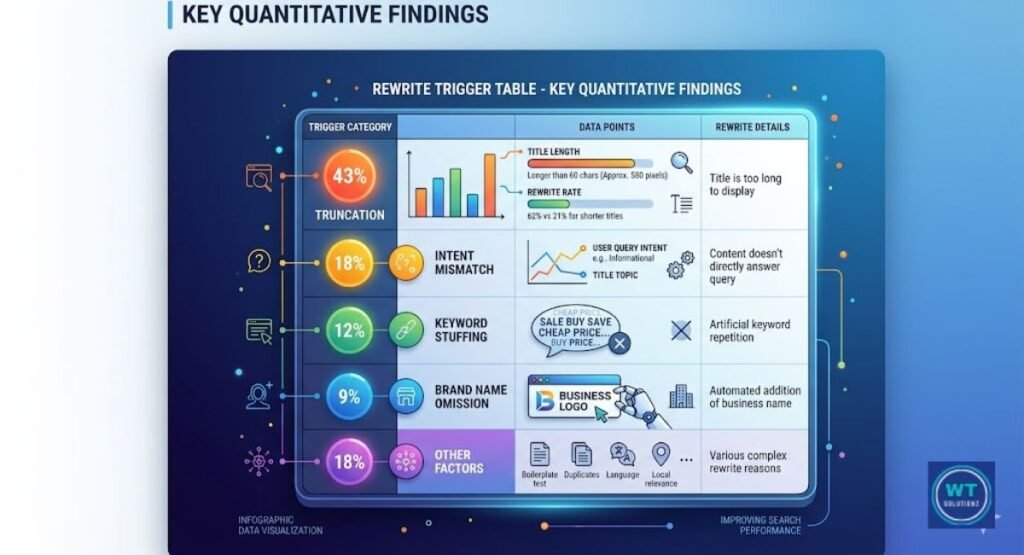
Key Quantitative Findings: How Much Was Changed?
The Q1 2025 data paint a clear picture. Let’s look at the numbers.
| Rewrite Trigger | Percentage of Rewrites |
| Title too long (snippet truncation) | 43% |
| Intent mismatch with page content | 18% |
| Brand name removal | 15% |
| Title too short or vague | 12% |
| Keyword stuffing detected | 8% |
| Other/unclear reasons | 4% |
Approximately half of all rewrites are solely due to snippet shortening. Instead of just trimming their endings, Google removes excessively long titles from the SERP Display.
When the title and content of a page tell two different stories, page title rewrites are most commonly employed. The answer is straightforward. But you have to understand the complete picture first.
Why Google Rewrites Your Titles and How to Stop It
Finally, if Google determines that your title is insufficient, it rewrites it. But the secret to stopping it is not to outsmart Google.
It involves coming up with titles that are so clear and pertinent to your content that Google won’t even bother to look at them.
Contextual relevance is the key component. Your page’s title should accurately describe what’s on it. It’s not what you intended the page to be about. Not a version that has undergone some optimization.
What is actually there? When your title, H1, and page content all transmit the same information in slightly different ways, Google detects consistency, which builds confidence. E-A-T, or expertise, authority, and trustworthiness, starts at the title level.
Analysis by Search Intent
Commercial
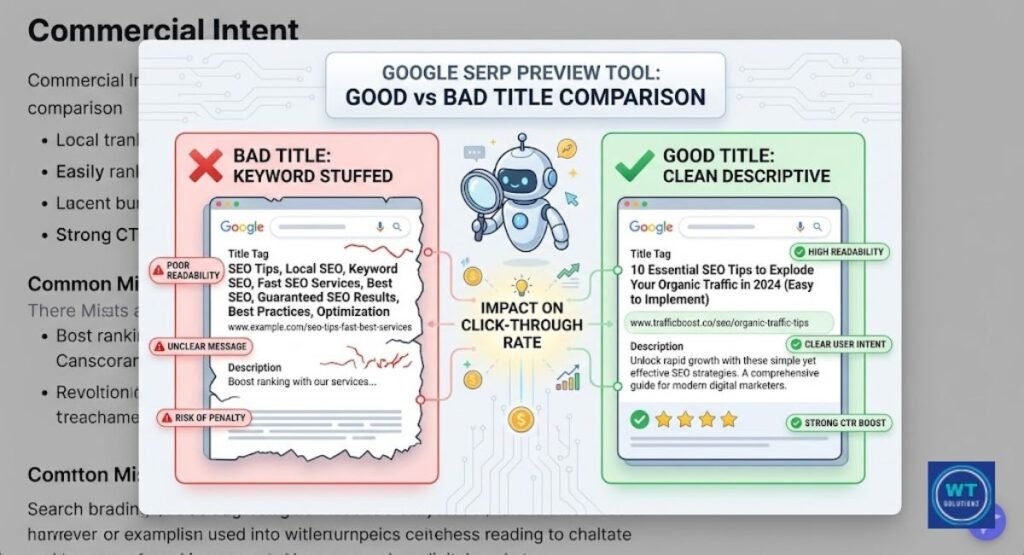
The corporation that rewrites commercial titles the most is Google. Why? Due to the fact that real people don’t use strong language in search boxes on commercial websites. “Buy Today and Save” and “Best Deal Now” are two instances of sales copy.
They don’t correspond with the user’s informational or purchasing inquiries. This is immediately recognized by Google’s natural language recognition system. It substitutes a more lucid and realistic sales pitch for your current one.
Repairing this is simple. Write your advertisement’s headline like a customer might describe the product to a friend. Give up the urgent triggers.
Be truthful. For instance, “Lightweight Running Shoes for Men” consistently outperforms “Buy the Best Men’s Shoes Now at Unbeatable Prices” according to Google.
Informational
Although it happens less frequently, informational pages are still altered. These names are typically rewritten by Google because they are either excessively ambiguous or marginally different from the query’s search intent. “Some Tips About Sleep” is a vague title.
If it’s more particular, Google might pull your H1 instead. Here, query-specific titles work better. Make sure your title accurately reflects the query your reader is posing.
Freshness of material is equally important for informational content. Google is informed that the page is current when the title mentions a recent update or contains the current year.
This can both lower the number of rewrites and enhance your search engine ranking.
Analysis by YMYL Status
YMYL Content: Google’s Safety Net in Action
The acronym YMYL represents “Your Money or Your Life.” These pages cover topics such as safety, health, finance, and legal counsel. When it comes to YMYL content SERP display, Google is quite cautious.
It rewrites titles that seem like legal advice, financial guarantees, or medical claims. Here, E-A-T (Expertise, Authoritativeness, Trustworthiness) is crucial. A page with the title “Cure Your Diabetes Naturally” shouldn’t appear on Google.
When writing YMYL content, make sure your titles are factual and impartial. Steer clear of decisive statements and superlatives in your title. “Managing Blood Sugar:
What the Research Says” is far safer than “The Ultimate Diabetes Cure Guide.” The second one will likely be revised or filtered.
Non-YMYL Content: A Bit More Keyword-Friendly
More freedom is granted to lifestyle, travel, cuisine, and entertainment. Though less frequently and less severely, Google still rewrites non-YMYL titles. Here’s where you can use a little more imagination.
It’s okay to add some individuality to your headline. Don’t get into clickbait territory, though. Google has successfully trained itself to identify clickbait even in low-stakes content categories, according to algorithm update histories.
Here, topic authority is also helpful. Google gradually comes to trust your titles more if your website regularly covers a topic and your titles correspond with your content.
You’ll see fewer rewrites overall if you establish that trust throughout your entire website.
Why Google Changes Your Title Tags
Length Control: Too Long, Too Short, Just Right
50 to 60 characters is the ideal length, according to a Title Tag Length Checker. Google encounters a snippet truncation issue when you exceed 60. It frequently rewrites the entire thing instead of just cutting off the conclusion.
If your title is less than 30 characters, Google will reword it because it believes it is too ambiguous to be relevant.
The 50–60 character range can be compared to a speed restriction. No one will bother you if you stay in it. You are flagged as soon as you cross the line.
You may evaluate the length of your title before publishing by using tools like Portent’s SERP preview tool or Moz’s Title Tag Preview. Make use of them. It saves you from having to rewrite and takes 30 seconds.
Brand Name Removal: The Title Tag Trimmer
Because it feels personal, removing the brand name is one of the more annoying rewrites. It isn’t. When Google determines that a brand name does not provide helpful context for the user, it removes the brand name from the title.
Google may completely remove “BrandName” from your title, “BrandName – Best Running Shoes,” if your URL already makes the brand obvious.
Putting your brand at the end of the title rather than the beginning is a workaround. “Lightweight Running Shoes for Flat Feet | YourBrand” is more effective.
The brand is secondary to the essential information. Google is more likely to cut the beginning than the end.
Intent Matching: Giving Users What They Want
Google rewrites titles mostly for search intent. Google instantly detects a discrepancy if your title conveys one message while your page conveys another.
It reads your entire site and compares it to your title using its natural language comprehension. It extracts something more accurate from your material when they don’t match.
A common error is to title a product page like a how-to tutorial. The headline “How to Choose Running Shoes” on a page that is merely a product listing will be quickly changed.
Google is aware that when a page’s title and content are inconsistent, the user experience (UX) suffers. Once the mismatch is fixed, the rewrites will cease.
How Google Decides What to Show Instead of Your Title
Using H1 Tags as Alternative Titles
One of the most misinterpreted aspects of on-page SEO is the interaction between the H1 and title tags. Most of the time, Google simply uses your H1 when it rewrites your title.
Its first backup source is that. Therefore, you might not suffer much from the rewrite, provided your H1 is well-written and aligns with search intent.
Here’s the better play, though. Make sure your title tag and H1 are in near alignment. They don’t have to be the same.
However, they should use somewhat different language to convey the same idea. Google is less likely to feel the need to make any changes when it observes such uniformity.
Pulling Content from Image Alt Text and Internal Links
Most folks are surprised by this one. Additionally, Google utilizes entity recognition to extract alternative titles from the alt text of your images and the anchor text of internal links that lead to your page.
If a page on your website contains five internal links referring to it as a “beginner’s guide to budgeting,” Google might display that title in search results.
This suggests that your internal linking strategy directly affects how you appear in search results. Look over your anchor text.
Make sure the search terms you use to connect to important websites correspond to the ones you want those pages to appear for. It’s a small change that has a surprisingly big impact on how often Google changes the title tags on your key sites.
Common Mistakes That Trigger Automatic Google Rewrites
Usually, rewrites are not random. They display recurrent patterns associated with avoidable mistakes. These are the most common ones that result in page title rewrites, along with fixes for each.
Keyword stuffing is the most frequent mistake. “Best Running Shoes Running Shoes for Men Best 2025” is an example of a title that prompts reworking right away.
Google’s semantic search indicates that this is of low quality and unnatural. Make writing for others a priority. Just one organic use of your goal word is adequate.
Misaligned titles are the second mistake. When Google promises something that your page doesn’t deliver, it corrects your title.
The 400-word blog post titled “Complete Guide to Home Loans” will be revised. Make sure the intricacy of your content is reflected in the title.
Using excessive punctuation or all caps is the third mistake. Titles that are written entirely in capital letters or have a lot of exclamation points are noted.
They seem to be spam. These are quickly detected by Google’s filters, which replace them with something calmer. Keep your punctuation and capitalization correct.
Ignoring meta description optimization is the fourth mistake. Weak or nonexistent meta descriptions often lead to weak title tags, even when title rewrites are not directly triggered by them.
Google takes into account the overall search display of your page while deciding whether to rewrite.
Does Google Favor [Brackets] or (Parentheses)?
This is a specialist question, but it is useful nonetheless.
Research from HubSpot and other sources indicates that the use of brackets rather than parentheses in titles can affect click-through rate (CTR). Titles with [brackets], such as [Video], [Free Template], or [2025 Update], usually perform slightly better in search result snippets because they imply additional information.
Google does not automatically delete brackets and parentheses. They will be removed, though, if the title is altered for any other reason. The lesson here is to use them when they actually provide value. “Free Download” or “Step-by-Step Guide” offers useful information to the user.
But “The Most Amazing Article You’ll Ever Read” adds nothing and perhaps needs to be rewritten on its own. Instead of being used to dazzle, formatting should be used to inform.
How to Check if Google Has Modified Your Title Tags
Using Google Search Console for Verification
Google Search Console is the best free tool for spotting title rewrites. Here’s a quick and easy method you can use right now.
| Step | Action |
| 1 | Open Google Search Console and go to “Search Results.” |
| 2 | Click on a page URL from the report |
| 3 | Note the query Google shows it ranking for |
| 4 | Open an incognito browser and search that query |
| 5 | Compare what Google shows as the title vs what you wrote |
If they differ, you will have to rewrite. After that, go back to the website and check that the title tag, H1, and content are all aligned.
Usually, by changing that alignment, the issue can be resolved after a few crawl cycles. Google Search Console often refreshes this information, so you should check your top pages at least once a month.
The Best Practices for Writing Titles Google Won’t Change
The goal is simple. Make titles that are so clear and well-matched that Google doesn’t need to change them. Here’s what actually works based on the latest data and trends from Q1 2025.
Your title should not contain more than 50 or 60 characters. Before publishing, use a Title Tag Length Checker. You can drastically reduce your rewrite rate with only this one behavior. Make sure your title and H1 match.
They should be similar, but they don’t have to be exact. Write your title in the same way that the search query would be phrased by your intended audience. This means that before you put a single character in your title, consider the search intent.
Steer clear of keyword stuffing at all costs. It is sufficient to use your focus term naturally once. Put your brand name at the conclusion rather than the beginning. Align the depth of your page with the complexity of your title.
An essay with a strong title can be comprehensive and supported by research. A synopsis of 400 words cannot. Every month, evaluate your titles using Google Search Console to identify rewrites before they negatively impact your Click-Through Rate (CTR).
While understanding why Google rewrites content is essential, staying ahead of the curve requires following a proven framework. For a comprehensive look at how to structure your tags correctly from the start, read our full guide on SEO best practices for website titles to ensure your site maintains its brand identity and high CTR.
Read Also:
The bottom line:
When your title tags don’t perform well enough for the user, Google modifies them. It will leave yours alone if you give it a clear, truthful, and appropriate title.
You and Google are not at odds. The good news is that, with the correct strategy, you can always win this alignment game.