Now that a major site update has been planned, you’re wondering does Maintenance Mode Affect SEO. Every website owner has asked themselves this question at some point. In a nutshell, it can, but only if you do it incorrectly.
When done properly, brief site outages hardly affect your results. When done incorrectly, it can lead to Googlebot crawl mistakes, harm your search visibility, and result in a severe decline in ranks following maintenance.
This article explains everything you need to know to safeguard the configuration of your website’s maintenance page and satisfy Google when your site is unavailable.
What is WordPress Maintenance Mode and When to Use It?
Your website is momentarily unavailable while in WordPress maintenance mode. Instead of your typical content, it displays a basic page for website upkeep.
Consider it similar to posting a “Back Soon” sign on the door of your store. Sometimes it’s essential, courteous, and professional.
It should be used when rebuilding pages, upgrading plugins, changing themes, and correcting issues. Without it, users could end up on a broken page in the middle of an update.
User Experience (UX) suffers as a result, and trust suffers even more. To safeguard both your visitors and your digital asset protection plan, use maintenance mode.
The Role of the HTTP 503 Status Code in SEO

The golden rule of maintenance mode is the HTTP 503 Status Code. It alerts search engine crawlers about the temporary inaccessibility of your website.
After reading this signal, Google concludes that it is temporary. I’ll return later. You want precisely that.
In the absence of an appropriate HTTP 503 Status Code, Google may assume that your website is permanently down. At that point, actual SEO harm starts. Make sure your maintenance plugin always returns a 503 error.
Tools like Google Search Console and HTTP Status Checker can be used to verify this.
| Status Code | What It Means | SEO Impact |
| 503 | Temporarily unavailable | Safe, Google waits |
| 200 OK | Page loads fine | Google may index the maintenance page |
| 404 | Page not found | Google may deindex the URL |
| 301 | Permanent redirect | Passes link equity elsewhere |
The Problem with Using a 200 OK or 404 Error Status for Maintenance
During maintenance, using a 200 OK status is a silent killer. When Google detects a live page, it begins to index your maintenance screen as authentic information.
“We’ll be back soon” appears in search results for your homepage all of a sudden. Nobody wants such unpleasant and harmful results.
Even more terrifying is a 404 Page Not Found answer. 404 is regarded by Google as a page that is always absent. It might eventually completely remove that URL from its index.
You run the danger of losing SEO equity, which may take months to recover. Use 503 at all times. Never accept anything less.
How Search Engines View Your Site During Maintenance
Imagine a librarian attempting to check out a book that is undergoing repair. They make a note of it and return later.
Search engine crawlers handle a proper 503 maintenance page in this manner. They pay attention to the signal and return in a timely manner.
Generally, Google offers a free pass for brief website outages. It’s okay for a few hours. Usually, even a day is sufficient. However, Googlebot crawl problems begin to accumulate if your website is down for multiple days without the proper signals.
When maintenance becomes a serious threat, that’s when your search visibility starts to decline, and rankings fall.
Fatal Mistakes to Avoid During Site Updates
The majority of website owners commit the same preventable mistakes. These are the five deadly errors that seriously harm a site’s SEO.
You are ahead of 90% of website owners if you know them.
Error 1: Incorrect HTTP Status Code. The most common issue is sending a 200 or 404 Page Not Found rather than an HTTP 503 Status Code. First, fix this.
Error 2: No Retry-After Header. Google is left in the dark when the Retry-After Header is skipped. Configure it to specify when crawlers should come back.
Error 3: Leaving Maintenance Mode On For Too Long. It is dangerous to have temporary site outages longer than 48 hours without a reason. Make sure to properly plan your maintenance window.
Error 4: Googlebot is blocked in robots.txt. Certain plugins unintentionally use the robots.txt file to restrict search engine crawlers. After turning on maintenance mode, check this right away.
Error 5: Don’t Test the Maintenance Page First. Before launching your website, always test the maintenance page. A malfunctioning maintenance page is worse than none at all.
| Mistake | Risk Level | Fix |
| Wrong status code | Very High | Force 503 in plugin settings |
| No Retry-After header | High | Add via plugin or .htaccess |
| Maintenance too long | High | Set a maintenance window |
| Blocking Googlebot | Very High | Check robots.txt before and after |
| Untested maintenance page | Medium | Always preview on staging first |
How the “Retry-After” Header Saves Your Rankings
The Retry-After Header is a small piece of code with a large job. It can be seen in your server response and tells Google when your website will be back up and running.
Consider sending the postman a note that reads, “Try again at 3 pm.” Google values this kind of openness.
Without the Retry-After Header, crawlers cannot decide when to return. The website might still be down if they come back too soon.
Or they wait too long and miss your fresh item. Either way, you lose. This header’s clever server-side option allows you to keep a decent crawling and indexing status during any upgrade.
// Example: Adding Retry-After in .htaccess
Header always sets Retry-After “3600.”
Advice: Enter the number of seconds for the Retry-After. An hour is equal to 3600. A full day is represented by 86400. Use common sense when it comes to your maintenance window.
Why Website Maintenance is Essential for SEO Success
This shift in viewpoint goes unnoticed by most individuals. Server maintenance SEO can be useful when done properly.
Regular maintenance fixes security issues, improves page speed, and fixes broken links. Google rewards all of these improvements with higher rankings.
Your Core Web Vitals (CWV) scores are greatly impacted by a well-maintained website. Slow load times, layout modifications, and poor interactivity all hurt your rankings.
During a scheduled maintenance time, you may precisely resolve these issues. Think of it like having your car serviced. A minor interruption today prevents a major disaster later on.
Best Design Practices for Your Maintenance Page
Your website maintenance page serves as your company’s temporary public face. Make a difference. Make sure people can quickly identify your brand.
Compose a heartfelt and understanding message. Tell visitors when you intend to return. Include a contact email to make sure nobody gets lost. Your website still has a great User Experience (UX) even if it is inaccessible.
Avoid outdated designs, generic error messages, and blank, empty pages. A poorly designed maintenance page instantly raises your bounce rate.
In just a few seconds, Google can identify when visitors are leaving. Keep it simple, branded, and mobile-friendly.
The SEO impact of your under-construction site will depend on how trustworthy and dependable people and crawlers regard your maintenance page.
Maintenance Page Must-Have Checklist:
- A headline that provides a detailed explanation of the outage’s cause
- Estimated return date and time
- The colors and logo of your business
- Social media contacts or email address
- Mobile-responsive design
- Use of the Noindex Meta Tag should only be intentional.
- Lack of Meta Refresh Tags that redirect users
How to Properly Set Up Maintenance Mode (Step-by-Step)
Setting up maintenance mode correctly is not as difficult as you would assume. It’s vital to prepare. You want everything to be prepared before you flip the switch.
When they rush this process, most people make costly mistakes that lead to indexing issues during maintenance.
Follow this meticulous process each time you shut down your website. It protects your ranks and keeps everything up to date for when you go back online.
Step-by-Step Setup Guide:
- Create a backup of your entire website, including the database and files.
- Choose a dependable maintenance mode plugin (see recommendations below).
- Force the HTTP 503 Status Code in your plugin’s settings.
- To reflect the expected outage window, modify the Retry-After Header.
- When making your maintenance page, use your brand’s colors and logo.
- Test everything in a staging environment before going live.
- When there is minimal traffic, which is typically late at night, activate maintenance mode.
- To verify the 503 response, use an HTTP status checker tool.
- Watch Google Search Console for any problems with Googlebot crawling during outages.
- Turn off maintenance mode once the updates are complete.
- Make sure all post-maintenance checks are finished before picking up your return.
Case Study: A mid-sized e-commerce website in the UK required a 36-hour makeover because of an insufficient 503 header. In just two weeks, organic traffic dropped by 34%.
They performed a 48-hour transfer with no ranking loss on their next update cycle after configuring the proper maintenance mode parameters. The only differences were an HTTP 503 Status Code and an appropriately supplied Retry-After Header.
Recommended Plugins for WordPress Maintenance
A smooth and SEO-secure strategy is ensured by choosing the right plugin. The HTTP 503 Status Code is handled incorrectly by several plugins.
Some automatically send a 200 response, which secretly eliminates your search exposure. Before using your plugin, always check the status code it sends.
These are the best WordPress maintenance mode plugins that have undergone SEO safety testing. Each has been chosen on the basis of design freedom, usability, and 503 support.
Select the one that best suits your site’s requirements and ability level.
| Plugin | Free Version | 503 Support | Retry-After Header | Best For |
| SeedProd | Yes | Yes | Yes | Beginners |
| WP Maintenance Mode | Yes | Yes | Partial | General Use |
| Maintenance (fruitfulcode) | Yes | Yes | No | Simple Sites |
| Coming Soon Pro | No | Yes | Yes | Advanced Users |
| UnderConstructionPage | Yes | Yes | No | Design-focused |
Recommended:With complete HTTP 503 Status Code support right out of the box, SeedProd is the most user-friendly choice for beginners.
Staging vs. Live Maintenance: Which is Better?
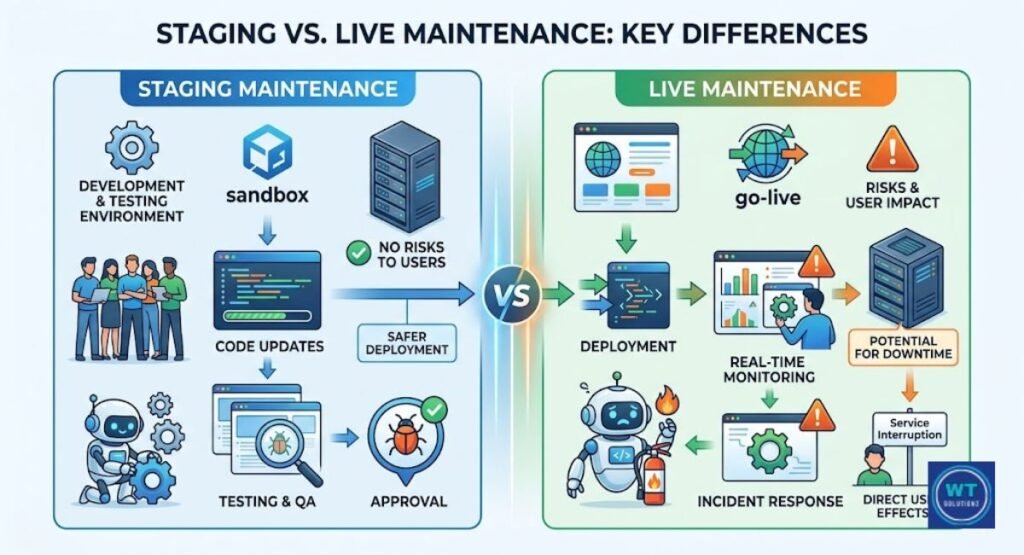
A hidden replica of your website where you can securely test modifications is called a staging environment. Your live site and Google rankings are unaffected by anything you do there.
It’s how large changes are handled professionally. Consider it a practice run before the performance.
There are situations when live maintenance mode cannot be avoided. Real downtime is frequently needed for database migrations, hosting relocations, and SSL Certificate (HTTPS) renewals. Always have a rollback strategy ready, set your 503 appropriately, and keep the window brief when you have to go live.
When you approach maintenance as a professional procedure rather than a hurried chore, the likelihood of rankings declining after maintenance decreases significantly.
| Factor | Staging Environment | Live Maintenance Mode |
| SEO Risk | Very Low | Medium to High |
| Best For | Redesigns, big updates | Security patches, migrations |
| Cost | Usually free | Free but riskier |
| Speed | Slower workflow | Faster deployment |
| Googlebot Impact | None | Moderate if done correctly |
What to Check After Your Site Is Back Online
When maintenance is finished, your work is not finished. After returning to the internet, the first half hour is crucial. Before you do anything else, go over your post-maintenance checklist.
You may lose rankings for weeks due to a broken link that was overlooked or a trapped Noindex Meta Tag.
Make sure your homepage loads properly first. Next, confirm that the HTTP 503 Status Code is no longer being returned. Make sure that your HTTPS SSL certificate is still valid.
Both your CDN and plugin should have their cache cleared. After that, go directly to Google Search Console and look for any new Googlebot crawl issues that surfaced during your outage.
Post-Maintenance SEO Checklist:
- Verify that the website loads on desktop and mobile devices.
- Use an HTTP checker to confirm that 503 is no longer returned.
- Examine all internal navigation menus and links.
- Empty the CDN and server cache.
- Use PageSpeed Insights to test the speed at which pages load.
- Use Screaming Frog to look for problems with Broken Link Building.
- Examine the canonical tags on important pages.
- Check to see whether Core Web Vitals (CWV) scores have decreased.
- Verify that there were no unintentional 301 Permanent Redirects.
- Look for coverage problems and crawl errors in Google Search Console.
Using Google Search Console for Faster Re-Indexing
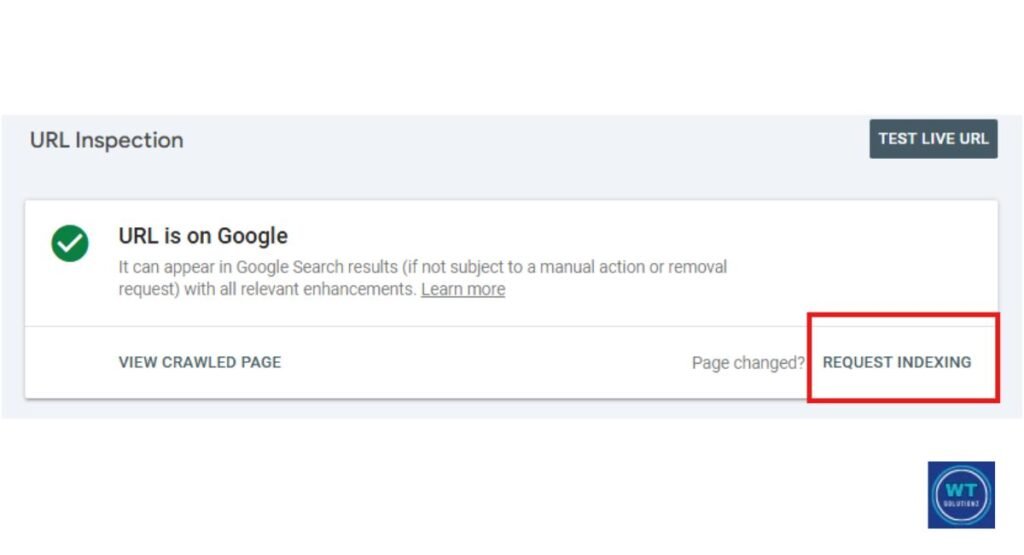
After maintenance, Google Search Console is your most potent free tool. To manually request indexing on your most crucial pages, use the URL Inspection Tool.
This lets Google know you’re back up and prepared for crawling. It greatly accelerates the restoration of your crawling and indexing status.
Submit your sitemap again using Google Search Console’s Sitemaps report after re-indexing important pages. Take a hard look at the Coverage report. Any URLs that continue to display problems must be fixed right away.
You can view your page just as Googlebot does by using the Fetch as Google feature, which is now known as URL Inspection. After your old content audit and revisions, use it to make sure everything appears tidy and indexable.
Read Also:
How to Enable Maintenance Mode in WordPress
How Much Do WordPress Maintenance Plans Cost
How to Fix WordPress Maintenance Mode
FAQS: Does Maintenance Mode Affect SEO?
Does maintenance mode affect my Google rankings?
It is possible to do it incorrectly. Google is informed that the outage is brief via an accurate HTTP 503 Status Code. Rarely do short maintenance windows result in a ranking decline.
Should I use a 503 or 200 status code for maintenance?
The HTTP 503 Status Code should always be used. Google will index your maintenance page as legitimate content if it receives a 200 OK. As a direct result, your search visibility and ranks decline.
How long can I keep my website in maintenance mode safely?
Limit the duration of your website’s unavailability to fewer than 24 to 48 hours for safety. Googlebot crawl errors then start to mount up rapidly. Always set a Retry-After Header to guarantee crawlers return on time.
Will my backlinks be lost if I turn on maintenance mode?
No, because hyperlinks are found on other websites, they stay intact throughout maintenance. Instead of a 503, a 404 Page Not Found answer can progressively reduce link equity. Use 503 at all times to protect your digital assets.
What is the difference between “Coming Soon” and “Maintenance Mode” for SEO?
A “Coming Soon” page is useful for brand-new websites without any rankings. Maintenance mode is used for live sites that are temporarily offline. Only maintenance mode requires an HTTP 503 Status Code to protect your crawling and indexing status.
Can I use a plugin to set up maintenance mode without hurting SEO?
Yes, trustworthy WordPress maintenance mode plugins like SeedProd handle this properly. They offer the relevant HTTP 503 Status Code right away. After activation, always verify the answer code for safety.
What should I do after taking my site out of maintenance mode?
Immediately check your SSL certificate (HTTPS), clean your cache, and fix broken links. Use Google Search Console to request that your most important pages be indexed. Send in a fresh sitemap to speed up recovery.
Does a maintenance page cause crawl errors in Google Search Console?
A legitimate 503 page shouldn’t have any crawl issues at all. However, an inaccurate 200 or 404 Page Not Found response will quickly cause coverage issues. Always verify your status code as soon as you enter maintenance mode.
How does the “Retry-After” header help during site maintenance?
The Retry-After Header tells search engine crawlers exactly when to come back to your webpage. Without it, Googlebot may record errors and make premature returns. It’s one of the simplest ways to protect your server and maintain SEO.
Can Google de-index my site if maintenance mode stays on too long?
Yes, if your URLs are unavailable for more than a week, they might be deindexed. Pages that Google cannot access are routinely removed from its index. Use the Retry-After Header and always restrict the duration of a website’s unavailability to be safe.
Final Thoughts: Keeping the Lights On for Google and Users
Maintenance mode doesn’t have to have a bad effect on your rankings.
Google views the outage as a brief inconvenience and goes on when it is properly configured with an HTTP 503 Status Code, a clear Retry-After Header, and a well-designed website maintenance page.
Your search visibility is protected, and users feel appreciated.
It is possible to avoid all five of the fatal mistakes covered in this tutorial. Plan your maintenance windows carefully. Use a trustworthy plugin.
Testing in a staging environment should come first. Examine your website carefully after you’re back online.
Regular maintenance of this will improve the overall health, Core Web Vitals (CWV) scores, and internal connecting structure of your website.
When performed properly, maintenance is an investment rather than a threat to your SEO.