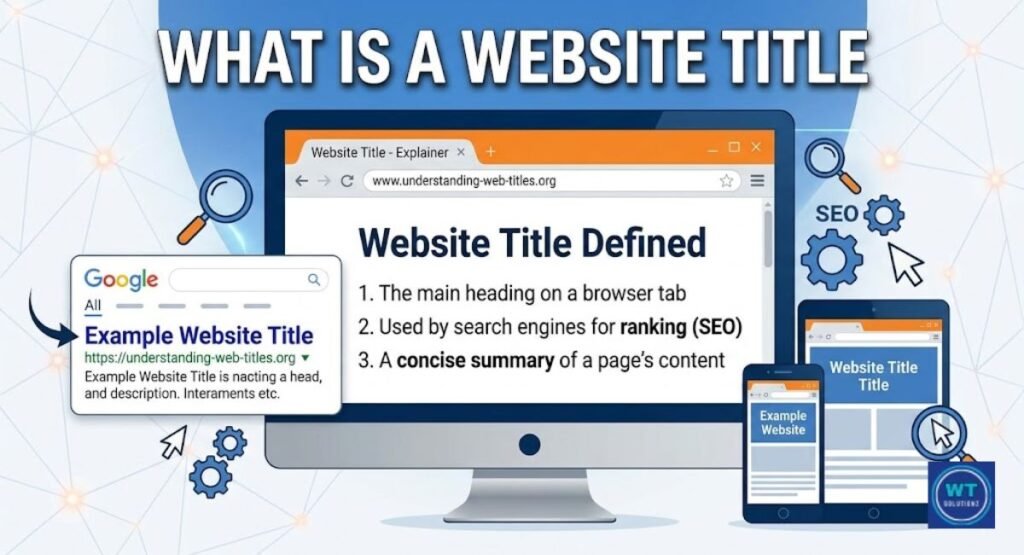
Most people are obsessed with rankings. In actuality, if your meta description is badly worded, no one will click on it. Not even among the top three. Think of it as your digital advertisement on Google.
It is the short HTML property that shows up underneath your page title on search engine results pages. It gives you a summary of your page. The click is sold. In addition, a one-size-fits-all strategy is ineffective in 2026.
Why? Due to the fact that desktop screens display more text than mobile screens. Most writers are unaware of how much of a gap there is.
Understanding what is the length of meta description is for each device is one of the most important SEO skills nowadays, as it involves knowing the precise SERP snippet length for each device.
This post shows why pixel-based truncation is silently hurting your traffic and discusses the ideal character count for both screens.
What Is a Meta Description and Why Does It Matter in 2026?
A meta description is a brief HTML excerpt that tells Google what your webpage’s purpose is. It is directly incorporated into your page’s code. Sometimes Google detects it and displays it as the little gray text just beneath your blue title link on the search results page.
Consider it your page’s one-time pitch to a new audience. Just one sentence. One opportunity. They’ll either scroll past you or click.
Google’s steadfast commitment to mobile device indexing is what sets 2026 apart. This indicates that Google gives preference to seeing your website on a mobile device rather than a desktop or laptop. In addition, the majority of Americans use their phones for routine searches.
You are unintentionally losing clicks if your website looks great on a big laptop screen but is cropped on an Android phone. This poses a serious issue. In this case, there is a traffic leak.
Desktop and mobile devices display different amounts of text. Additionally, your rivals who identify and resolve this disparity will continuously receive clicks before you.
Meta Description Length: Desktop vs Mobile
Most instructions start to become lazy at this stage. They pronounce it finished after spitting out a character number. However, the true tale is more fascinating. Your meta description is not measured in characters by Google. Pixels are used to measure it. That completely alters your writing style.
Desktop Meta Description Length: The 920-Pixel Limit
Google provides you with 155–160 characters on a desktop screen. This is equal to the 920 pixel desktop limit of the snippet display container. 155 characters seem easy today.
The problem is that a capital “W” needs nearly three times as many pixels as a lowercase “i.” As a result, a text with few characters will not display on the desktop viewport wall as quickly as a sentence with broad letters, including “W,” “M,” and capital letters. This truncation is based on pixels. Even experienced SEOs are perplexed by it.
So what does this mean to you? This suggests that the optimal character count for a desktop is between 140 and 155. Furthermore, you shouldn’t go below 120 since, even worse, Google will often rewrite your snippet using content from irrelevant pages when you use a brief explanation.
Aim for full, complex sentences to make the most of the available space.
Mobile Meta Description Length: The 680-Pixel Limit
Mobile is more limited. considerably tighter. On most smartphones, Google’s snippet box can only hold 120 characters, or around 680 pixels (mobile). That is a significant 35 fewer characters than on a desktop. Furthermore, 35 characters is almost a sentence’s entire clause.
Therefore, if your essential message is between characters 130 and 155, mobile users will never see it. Not present. Cut a piece. replaced by three dots.
This is specifically due to the way mobile search results show up on smaller screens. The SERP snippet’s length is shortened to fit the viewport. No override is available.
There’s no getting around it. It is your duty to write with the understanding that mobile devices will always display less and to account for this from the beginning.
Characters vs. Pixels: Why This Difference Changes How You Write
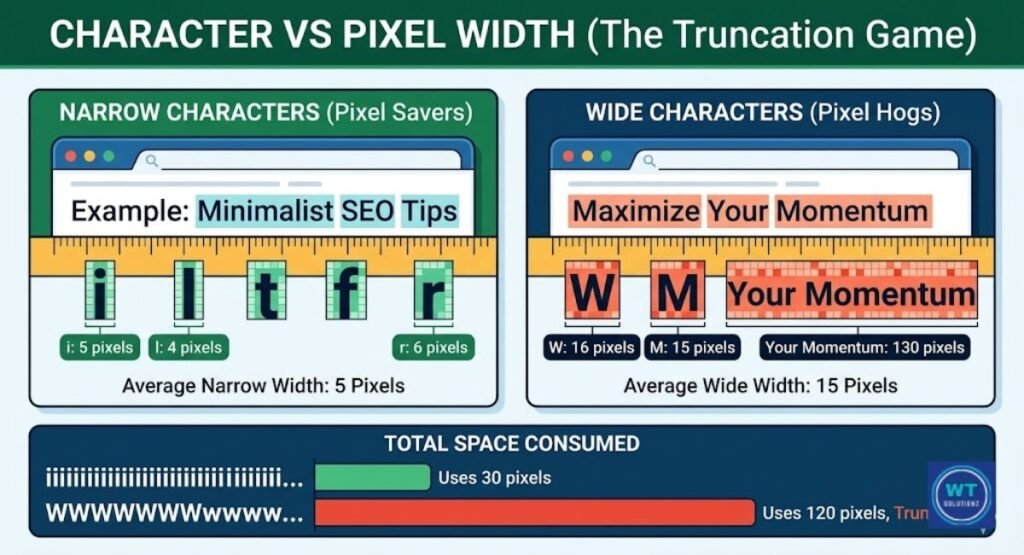
The majority of authors count their characters. Pixels are counted by Google. A good snippet differs from a mediocre one because of this. To better clarify this, consider the following comparison.
| Letter Type | Example Letters | Pixel Width (Approx.) |
| Narrow letters | i, l, t, f, r | 4–6px each |
| Medium letters | a, e, n, o, s | 7–9px each |
| Wide letters | m, w, W, M | 13–16px each |
| Capital letters | A, B, C, D | 9–12px each |
As a result, words like “Maximize,” “Workflow,” and “Momentum” deplete your pixel budget faster than words like “find,” “list,” or “tips.” Because of this, the width of the snippet display matters more than the entire character count. Write more concisely. Use shorter words. Your excerpt will appear better on both screens.
| Device | Character Limit | Pixel Budget | Safe Writing Zone |
| Desktop | 155–160 chars | ~920px | 140–155 characters |
| Mobile | ~120 chars | ~680px | 110–120 characters |
| Universal Sweet Spot | — | — | First 110–120 chars carry the full message |
The Truncation Effect: What Really Happens When You Go Over
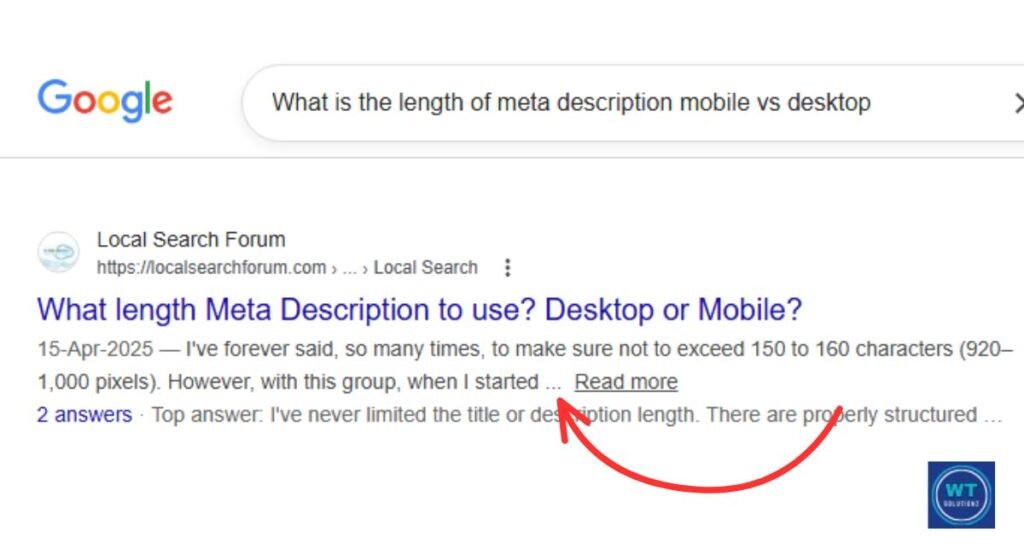
Truncation. It sounds technical. But you’ve seen it a thousand times. When a search snippet’s description is too lengthy, a tiny ellipsis (…) appears at the end. Google just chops the text in half and adds three dots. Additionally, that little punctuation character is quietly destroying your organic click-through rate (CTR).
It hurts because of this. When a user reads a sentence that ends in “…”, they don’t feel informed. Research from Backlinko consistently shows that search visibility decreases when snippets are incomplete.
Users trust clear, complete sentences. A condensed passage quietly raises the possibility that the page is disorganized as well. It’s not fair. But it’s true. Understanding pixel-based truncation is the first step towards solving it permanently.
The Strategic Sweet Spot: Writing Meta Descriptions for Both Devices
This is the exact tactic used by experienced SEOs. We refer to it as front-loading keywords. The concept is very straightforward: provide your most crucial details in the first 110 to 120 characters. Always. Every single time. There are no exceptions.
The Front-Loading Technique That Protects Your Message
When you employ front-loading keywords, your main keyword, your main advantage, and your user search intent answer are all in the first sentence. Even if Google truncates your snippet at the 120-character mobile restriction, the reader still gets the main concept.
Nothing important is lost. Like a news headline, the most crucial information is always presented first. This technique protects your material on mobile search results while providing desktop readers with a thorough and compelling read.
This is an actual example of a before and after:
Before (back-loaded, mobile users miss the point): “If you’re trying to improve your website’s traffic and want to understand SEO better, this guide covers the length of meta description mobile vs desktop.”
The following is front-loaded and compatible with both devices: “Learn the exact meta description length for mobile vs desktop, and write snippets that drive more clicks on every device.”
The value is provided in the first 100 characters in the second version. astute. tidy. efficient.
The 155-Character Rule for Desktop Users
Characters 121 through 155 make up your additional territory. Desktop users can see them. Mobile device users don’t. In order to attract desktop searchers, make effective use of this space and provide a mild call to action (CTA) or a supporting advantage. If it is cut on a mobile device, the first sentence will be adequate. Nothing breaks.
The message is true. This is how you create a single, unwavering description that is compatible with both screens.
Does Meta Description Length Affect Your SEO Rankings?
Let’s discuss this now, as a lot of websites misinterpret it. No, a rating is not directly impacted by a meta description. Google has made this very evident with Google Search Central. The Google Algorithm does not read your snippet and advance you when you reach the optimal character count. So why are we spending so much time on it?
Because of the click-through rate (CTR) that occurs naturally. CTR is also quite significant. This is how it works: when your SERP snippet is both interesting and the right length, more people click on your link. The quantity of clicks is recorded by Google Search Console. The technology detects when users choose your result above others.
Significant relevance throughout time is indicated by this. Google also favors relevant pages. Consequently, even while meta descriptions don’t directly raise your rank, they do contribute to the behavior that does. This on-page SEO indicator makes use of human psychology rather than code.
Why Google Rewrites Your Meta Description: And How to Stop It
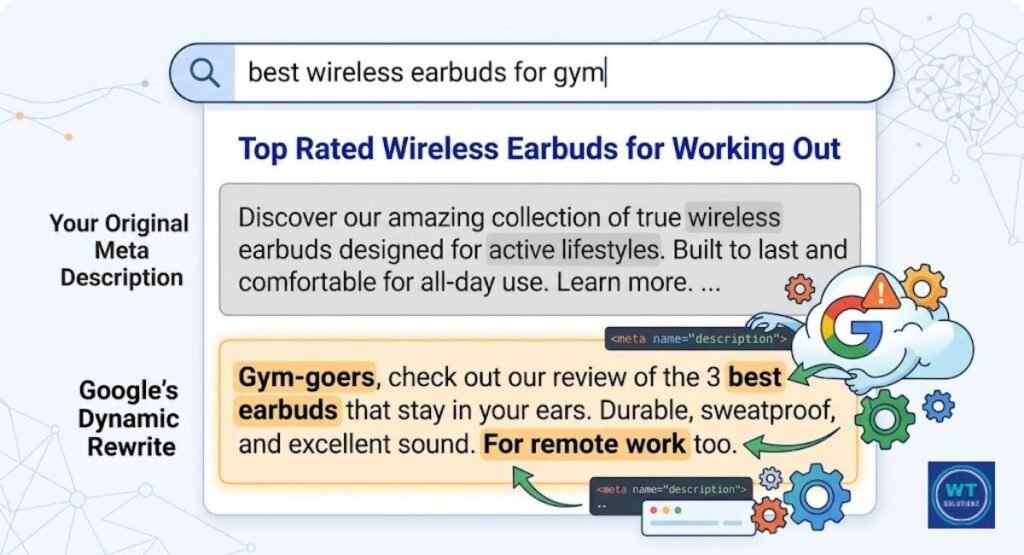
This is an annoying reality. Even if your meta description is flawless, Google may still completely disregard it. According to a Zyppy study, Google rewrites snippets between 62 and 70 percent of the time. That is a substantial amount. It implies that most of your descriptions are replaced with something that Google finds more appealing.
Why does this happen? The most common reason is a mismatch between your description and the user’s actual search query. Google uses dynamic snippets; it examines your page’s content and generates a special snippet that, in its opinion, more correctly reacts to user input.
If your description seems too generic, has too many keywords, or doesn’t adequately reflect the user’s search intent, Google will reject it.
Other triggers include descriptions that are too short, copying and pasting content from the body of the page, or having a false tone. The answer? Write your description as if you were answering a specific question.
Make sure it closely reflects what your page actually provides. Give it a human touch. Robotic-looking metadata attributes are the most commonly changed.
Best Practices for Writing High-Ranking Meta Description Snippets
Let’s discuss what really works. It’s not difficult to write an excellent meta description. Every business and niche can benefit from a repeatable approach that blends real persuasion with meta tag optimization.
Your greatest ally is action-oriented language. Use a power word at the beginning of your description, such as “Learn,” “Discover,” “Get,” “Try,” or “Find.” The reader’s brain makes a tiny choice as a result of these verbs.
They are motivated to take action. Compare “Information about meta descriptions” to “Learn the exact meta description length for mobile and desktop right now.” One is not involved. One draws you in. Particularly if you’re vying for clicks on a crowded search engine results page, the difference in CTR could be significant.
Additionally, each page on your website must have its own meta description. Not a single copy. Never. Duplicate snippets lower your search exposure across several websites and confuse Google. A clear call to action (CTA) must be included at the end of each description.
To give the user precise instructions, utilize terms like “Read the full guide,” “See the complete list,” and “Start for free today.” A passive reader becomes an active clicker when they see a call to action.
When combined with E-E-A-T (experience, expertise, authoritativeness, trustworthiness) signals in your content, it produces the kind of pertinent page summary that Google wants to retain and demonstrates that your page truly understands the subject.
Quick Best Practice Checklist:
| Practice | Why It Works |
| Put your keyword first | Mobile cuts the end, your point stays safe |
| Kick off with an action word | “Get” and “Learn” push people to click fast |
| End with one clear next step | Tells the reader exactly what to do next |
| Keep it between 140–155 characters | The desktop shows it clean with zero cut-off |
| Write a fresh description on every page | Stops Google from mixing up your pages |
| Write for what the user actually typed | Google keeps your snippet instead of replacing it |
Recommended Tools to Preview Your Meta Description on Mobile and Desktop
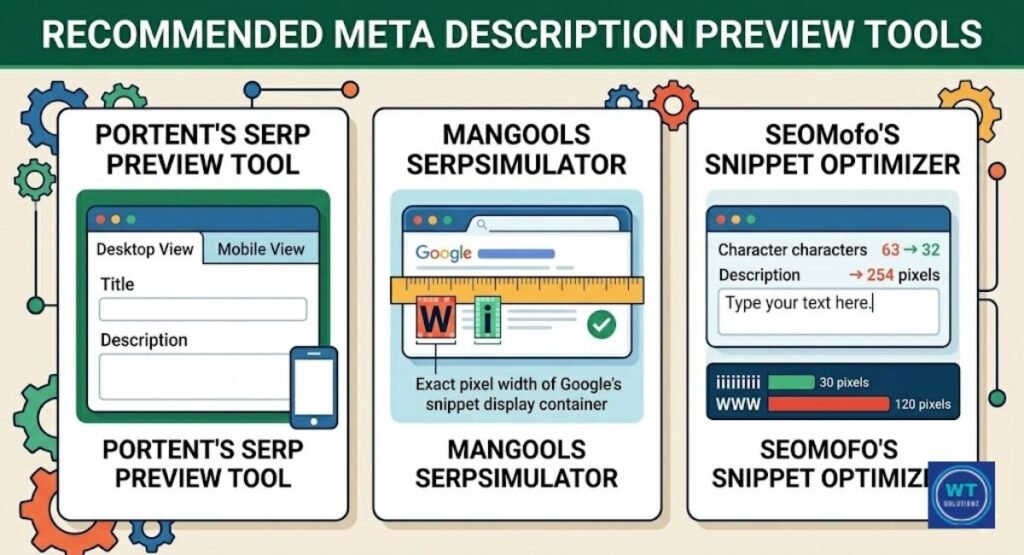
Before publishing a page, you should always preview your snippet. Guessing is useless. These three free tools allow you to examine exactly how your meta description appears on both screens before it goes live.
You can see a side-by-side simulation of your snippet on desktop and mobile devices using Portent’s SERP Preview Tool at portent.com. It’s quick, free, and clean.
You can see precisely where your text is clipped with Mangools SERPsimulator at mangools.com, which goes one step further by replicating actual Google SERP characteristics with pixel accuracy.
Additionally, for writers who wish to comprehend pixel-based truncation in real time, SEOmofo’s Snippet Optimizer at seomofo.com is a lightweight program that counts characters and pixels simultaneously.
Both Yoast SEO and Rank Math have integrated snippet preview features that provide desktop and mobile views within your editor if you’re using WordPress. Make use of them at all times.
See Also
How Meta Descriptions Impact SEO
How to Remove Duplicate Meta Descriptions
How to Improve Meta Description Organic CTR
Summary
In summary, in 2026, the length of a mobile versus desktop meta description will be more important than before. Your snippet is truncated at about 120 characters on mobile devices.
You have up to 155 breathing room on a desktop. There is a gap. You lose clicks every day if you ignore it. You now understand the operation of pixel-based truncation.
You can see why your message is protected on every screen by front-loading keywords. Additionally, you are aware that a compelling call to action (CTA) at the conclusion encourages passive readers to click.
This is not complicated at all. Every publication only requires two minutes of deliberate writing.
So quit speculating. Don’t write a single general sentence and hope that Google will retain it. Make use of the tools we discussed for previewing snippets.
Align your description with the actual search intent of the user. Prioritize writing for people.
Additionally, before your page goes live, make sure to verify both your desktop and mobile viewports. The initial exchange you have with a prospective visitor is your meta description.
Make it matter. Make it obvious. Make it impossible to go on.